
Velocity Force Vector Simulation: Decomposing Force and Motion
Loading the math board and drawing, please wait…
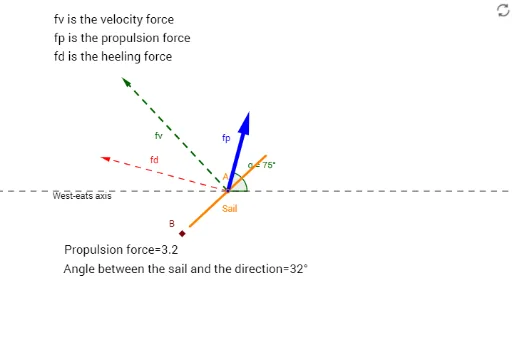
This example visualizes the decomposition of velocity and force vectors, showing how their directions and magnitudes affect an object's motion. The core mathematics includes vector addition and subtraction, angle measurement between vectors, coordinate geometry for positioning, geometric construction using basic objects, and transformations such as rotation. The GeoGebra construction uses commands like Line, Circle, Intersect, Segment, OrthogonalLine, Vector, Rotate, Angle, and Length to create points, line segments, vectors, and rotated shapes, allowing interactive exploration of force vectors. It is intended for high‑school and early‑university students studying physics and mathematics, especially those learning about vectors, kinematics, and mathematical visualization.
GeoGebra Commands & Parameters
Line(A, B) → fCircle(A, 2) → cIntersect(c, f) → C, DSegment(D, C) → SailOrthogonalLine(A, Sail) → gCircle(A, 6) → dIntersect(d, g) → E, FVector(A, F) → fvLine(A, xAxis) → hRotate(G, 75°, A) → G'Angle(G, A, G') → αLine(A, G') → iOrthogonalLine(F, i) → jLine(A, j) → kLine(F, i) → lIntersect(k, l) → HIntersect(i, j) → IVector(A, H) → fdVector(A, I) → fpAngle(h, Sail) → βLength(fp) → FP
AI Drawing Prompt Reference
Visualize the decomposition of velocity and force vectors by drawing a simulation showing how their directions and magnitudes affect motion. Start with a base line and a circle centered at the origin, creating intersection points. Draw a perpendicular line to the base and find intersections with an enlarged circle to determine the force vector. Rotate a vector, measure angles, and draw perpendicular lines to create intersection points, forming two force components. Finally, measure angles and calculate component magnitudes to illustrate vector decomposition and motion relationships.
The prompt above was compiled from the original drawing commands and is for reference only.