
Vector Translation
Loading the math board and drawing, please wait…
In collections
学习 GeoGebra 经典应用
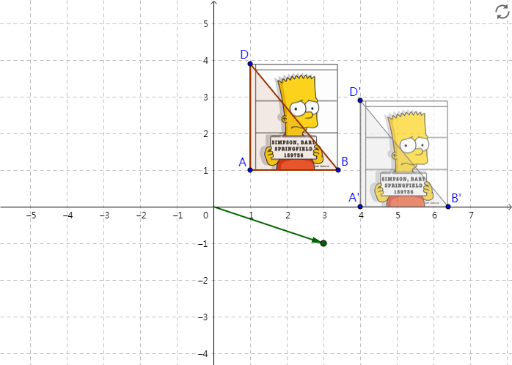
This example demonstrates how to translate an image by a vector. It involves the concept of vectors, particularly vector addition and scaling. Using GeoGebra's vector and translation commands, users can visually see how vectors affect the position and shape of the image. This example is suitable for middle school or high school students learning vector and translation concepts, especially those who need to visually understand the effect of vectors.
GeoGebra Commands & Parameters
Point(Circle[A, 2.400000000000001]) → BPolygon(A, B, D) → poly1, d, a, bIntersect(xAxis, yAxis) → OVector(O, P) → uTranslate(pic1, u) → pic1'Translate(A, u) → A'Translate(B, u) → B'Translate(D, u) → D'Polygon(A', B', D') → poly1', d', a', b'
AI Drawing Prompt Reference
Construct a triangle defined by three vertices in the coordinate plane, then create a vector starting from the origin. Translate the triangle along this vector to create an identical triangle in a new position, and simultaneously translate an image using the same vector to demonstrate the effect of vector translation.
The prompt above was compiled from the original drawing commands and is for reference only.