
Vector Parametrization of a Line
Loading the math board and drawing, please wait…
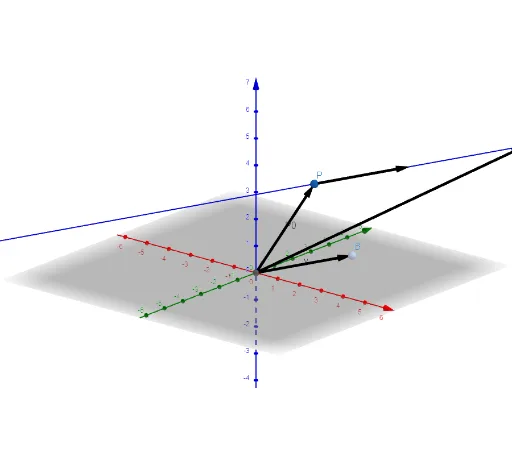
① This example demonstrates how a line in 3D space can be described by a fixed point and a direction vector, with a parameter t controlling the position of any point on the line. ② Core mathematical concepts include vectors, parametric equations, direction vectors, position vectors, and the geometric meaning of the parameter t, forming a foundation for analytic geometry in three dimensions. ③ Construction details: using GeoGebra commands such as Intersect to find intersection points, Vector to create vectors, and Line to construct the line; objects include points A and B, direction vector u, moving point P, reference point P0, vector w, parameter t, line a, and function f (possibly for auxiliary display). ④ Suitable for high school or early university students learning vector geometry and spatial line equations, and for teachers demonstrating how parameter changes affect point positions on a line.
GeoGebra Commands & Parameters
Intersect(yAxis, zAxis) → AVector(A, B) → uVector(A, P) → P0Vector(P, P + B) → wVector(A, P + (t * B)) → aLine(P, P + B) → f
AI Drawing Prompt Reference
In 3D space, place two fixed points, one as a reference point and the other to define a direction vector. Draw a line through the reference point along the direction vector, and add a movable point controlled by a slider that slides along this line. From the reference point, draw a position vector to the moving point, and also show an auxiliary vector from the moving point to the sum of the moving point and the direction vector, illustrating how the parameter affects the point's location. The scene includes the line, the moving point, the reference point, the direction vector, and two auxiliary vectors, demonstrating the parametric description of a line in space.
The prompt above was compiled from the original drawing commands and is for reference only.