
Vector in 3D
Loading the math board and drawing, please wait…
In collections
C4 vectors
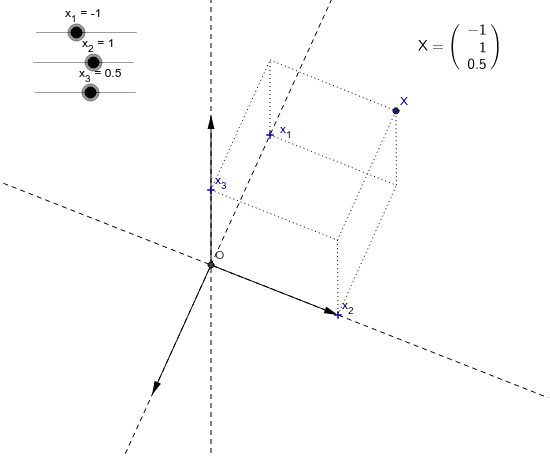
This example demonstrates vector operations in 3D space, including vector addition, dot product, and vector projection onto lines. It involves core math concepts like vector arithmetic and spatial geometry. Constructed using commands such as Intersect, Vector, Point, Line, and Segment, suitable for high school and above learning 3D geometry and vector analysis.
GeoGebra Commands & Parameters
Intersect(xAxis, yAxis) → OVector(O, Px_1) → Ux_1Vector(O, Px_2) → Ux_2Point(yAxis) → Px_3Vector(O, Px_3) → Ux_3Line(O, Px_1) → aPoint(prx_1) → x_4Line(O, Px_2) → bLine(O, Px_3) → cPoint(prx_2) → x_5Point(prx_{12}) → Px_{12}Segment(x_4, Px_{12}) → dSegment(x_5, Px_{12}) → ePoint(prx_3) → x_6Point(prx_{13}) → ASegment(x_6, A) → fSegment(x_4, A) → gPoint(prx_{23}) → BSegment(x_6, B) → hSegment(B, x_5) → iPoint(Vu) → XSegment(A, X) → jSegment(B, X) → kSegment(Px_{12}, X) → l
AI Drawing Prompt Reference
Draw a 3D coordinate system with origin and x, y axes, then plot vectors from the origin to points Px_1 and Px_2 on the x-axis labeled Ux_1 and Ux_2, and a vector from the origin to point Px_3 on the y-axis labeled Ux_3. Construct lines a, b, c through the origin and Px_1, Px_2, Px_3 respectively, and find the projections of Ux_1 and Ux_2 onto line c at points x_4 and x_5, then connect these points and projection segments to visualize vector addition, dot product, and projection.
The prompt above was compiled from the original drawing commands and is for reference only.