
Vector Algebra: Intersections of Line and Half-Circle
Loading the math board and drawing, please wait…
In collections
Light
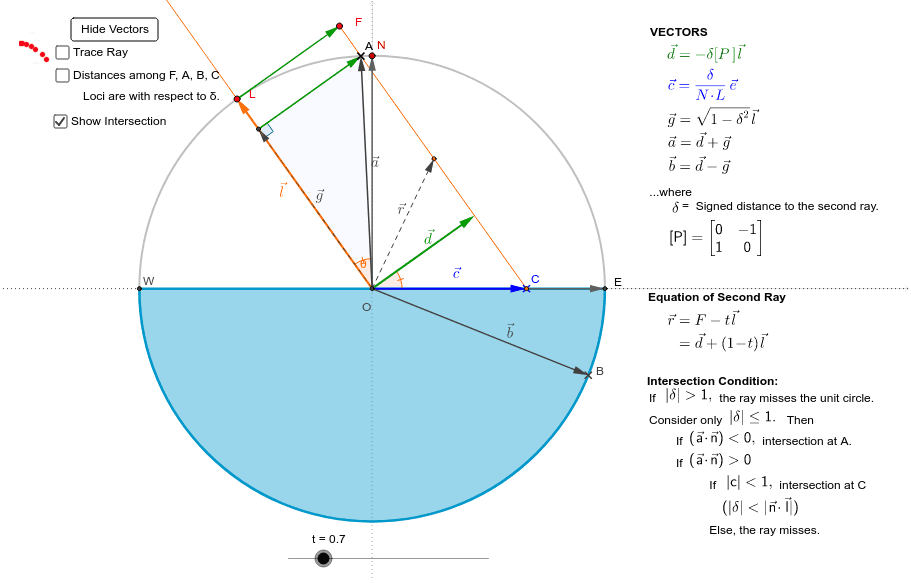
This example demonstrates how to determine the intersection point between a ray parallel to an initial ray and a half-circle using GeoGebra. Key mathematical concepts include vectors, coordinate geometry, geometric construction, and locus. It utilizes commands and objects such as Intersect, Circle, Point, Vector, Ray, OrthogonalLine, Line, Angle, Segment, CircleArc, Locus, and If. Suitable for high school and above students exploring vector interactions with geometric shapes.
GeoGebra Commands & Parameters
Intersect(xAxis, yAxis) → OCircle(O, 1) → unitCirclePoint(unitCircle) → NVector(O, N) → nPoint(unitCircle) → LVector(O, L) → lRay(Lamp, O) → p1OrthogonalLine(L, p1) → pPoint(p) → FVector(L, F) → uVector(O, -δ * Perp * l) → dVector(-Perp * n) → eLine(O, N) → northAngle(n, l) → θAngle(C, O, D) → ξVector(G, A) → zAngle(O, G, A) → κSegment(W, E) → fCircleArc(O, W, E) → blockLine(O, E) → eastLocus(H, t) → loc1Locus(dFB, F) → loc2Locus(dBC, F) → loc4Locus(dFC, F) → loc5Locus(dAC, F) → loc6Locus(dFA, F) → loc7If(abs(δ) ≤ 1, If[NA < 0, A, If[abs(δ) < abs(N * L), C, Q]], Q) → JSegment(F, J) → sSegment(Lamp, If[NL > 0, O, L]) → hSegment(M, P) → kVector(O, L) → vSegment(a + 0.25 * Perp * a, a - 0.25 * Perp * a) → RVector(A, S) → wAngle(S, A, F) → θ'If(NA < 0, true, false) → AbelowIf(NL < 0, true, false) → Lbelow
AI Drawing Prompt Reference
Draw the intersection point between a ray parallel to an initial ray and a half-circle, demonstrating vectors, coordinate geometry, geometric construction, and locus. Start by plotting the axes intersection, draw a unit circle centered at the origin, take two points on the circle to create vectors, then draw a parallel ray intersecting the circle. Find the intersection point and create vectors from the origin and between points. Next, draw a perpendicular line, find the foot of the perpendicular, and create vectors. Finally, plot loci and connecting segments based on conditions.
The prompt above was compiled from the original drawing commands and is for reference only.