
Vector Addition: Triangle and Parallelogram Law
Loading the math board and drawing, please wait…
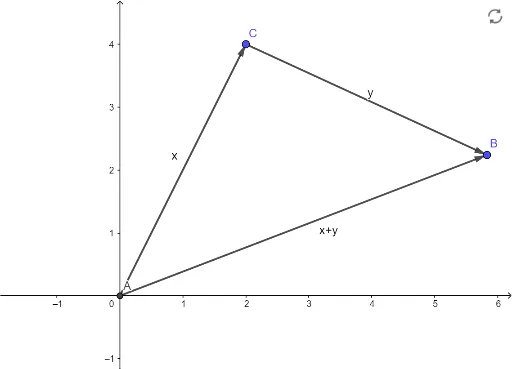
① This GeoGebra example dynamically demonstrates the addition of two vectors u and v, visually illustrating both the triangle law (head-to-tail) and the parallelogram law (diagonal) of vector addition. ② The core mathematical concept is vector addition, including geometric representation, initial and terminal points, and the commutative property. ③ Construction highlights: uses the Intersect command to find intersection points and Vector command to create vectors; objects include points A, C, vectors v, u, and the resultant vector w; dragging points or sliders changes vector magnitudes and directions to observe the resultant. ④ Suitable for high school or early college students learning vector geometry, and for teachers to demonstrate in class, helping students grasp the geometric meaning of vector addition and prepare for topics like vector decomposition and force composition in physics.
GeoGebra Commands & Parameters
Intersect(xAxis, yAxis) → AVector(A, C) → vVector(C, B) → u
AI Drawing Prompt Reference
Draw a dynamic illustration showing vector addition using both the triangle and parallelogram laws. Start by plotting the intersection of the x and y axes, then draw two vectors starting from this point. Connect the heads of these vectors to form a triangle, and also draw the parallelogram with its diagonal representing the resultant vector. Allow users to drag the start or end points of the vectors to change their magnitudes and directions, observing how the resultant vector changes.
The prompt above was compiled from the original drawing commands and is for reference only.