
Vector Addition Sample
Loading the math board and drawing, please wait…
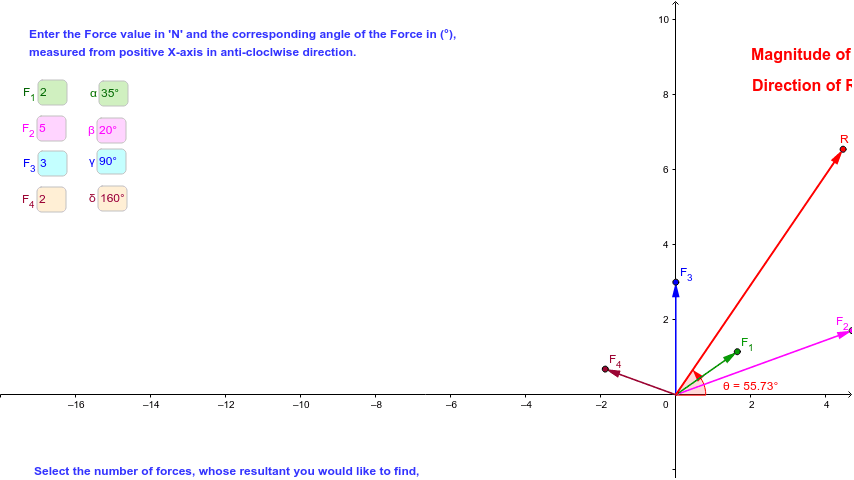
This example demonstrates the process of vector addition. Key mathematical concepts include the geometric representation and addition of vectors. Using GeoGebra commands such as Rotate, Vector, and Length, the dynamic effect of vector addition is shown. Suitable for students at the junior high school level and above to learn basic concepts and operations of vectors.
GeoGebra Commands & Parameters
Rotate(A, α, B) → A'Angle(A, B, A') → εRotate(C, β, B) → C'Angle(C, B, C') → ζRotate(D, γ, B) → D'Angle(D, B, D') → ηRotate(E, δ, B) → E'Angle(E, B, E') → θ_1DynamicCoordinates(A, (a * cos(α)), (a * sin(α))) → F_1DynamicCoordinates(B, (b * cos(β)), (b * sin(β))) → F_2DynamicCoordinates(C, (c * cos(γ)), (c * sin(γ))) → F_3DynamicCoordinates(D, (d * cos(δ)), (d * sin(δ))) → F_4Vector(B, F_2) → F_6Vector(B, F_1) → F_5Vector(B, F_3) → F_7Textfield(a) → inputBox1Textfield(b) → inputBox2Textfield(c) → inputBox3Textfield(d) → inputBox4Textfield(α) → inputBox5Textfield(β) → inputBox6Textfield(γ) → inputBox7Textfield(δ) → inputBox8DynamicCoordinates(A, Rx, Ry) → RVector(B, R) → R_2Vector(B, F_4) → F_8Length(R_2) → iPoint(xAxis) → JAngle(J, B, R) → θ
AI Drawing Prompt Reference
Draw a vector addition example. First, draw vectors A, B, C, and D. Then, rotate these vectors around point B to get A', C', and D'. Input angles α, β, γ, and δ, and generate vectors F1, F2, F3, and F4 based on the input angles and vector lengths a, b, c, and d. Connect point B to F2, F1, F3, and F4 to get vectors F5, F6, F7, and F8. Add vectors F5, F6, F7, and F8 to get vector R, connect point B to R to get vector R2. Calculate the length i of vector R2, and draw point J on the x-axis, then calculate angle θ.
The prompt above was compiled from the original drawing commands and is for reference only.