
Vector Addition in 2D
Loading the math board and drawing, please wait…
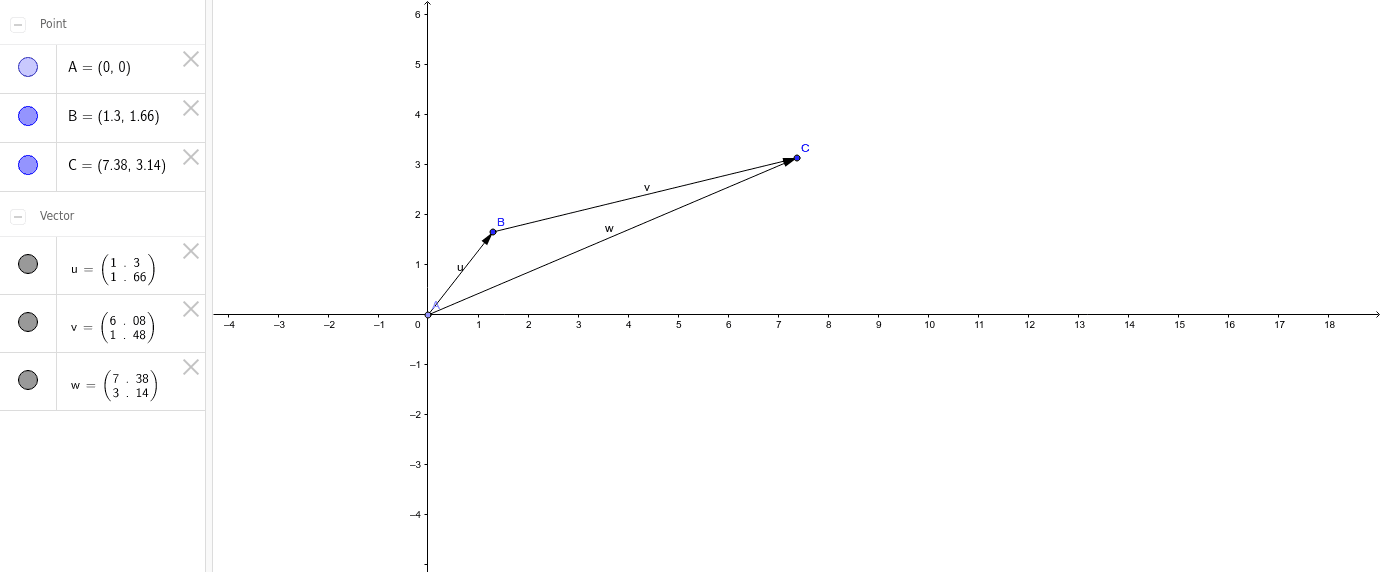
This example demonstrates the addition of vectors in two dimensions. Through the geometric representation of vectors, it intuitively shows the principle of vector addition. Using GeoGebra commands Point and Vector, vectors are created, and the result of vector addition is represented by connecting the tails of the vectors. Suitable for students at junior high school level and above to learn basic concepts of vectors and geometric construction.
GeoGebra Commands & Parameters
Point(yAxis) → AVector(A, B) → uVector(B, C) → v
AI Drawing Prompt Reference
Draw two vectors in a 2D plane by first placing a point, then drawing a vector from this point to another point, followed by drawing a second vector from the endpoint of the first vector to a third point, and finally connecting the starting point of the first vector to the endpoint of the second vector to illustrate the geometric principle of vector addition.
The prompt above was compiled from the original drawing commands and is for reference only.