
Vector Addition Demonstration by Steve Cheung
Loading the math board and drawing, please wait…
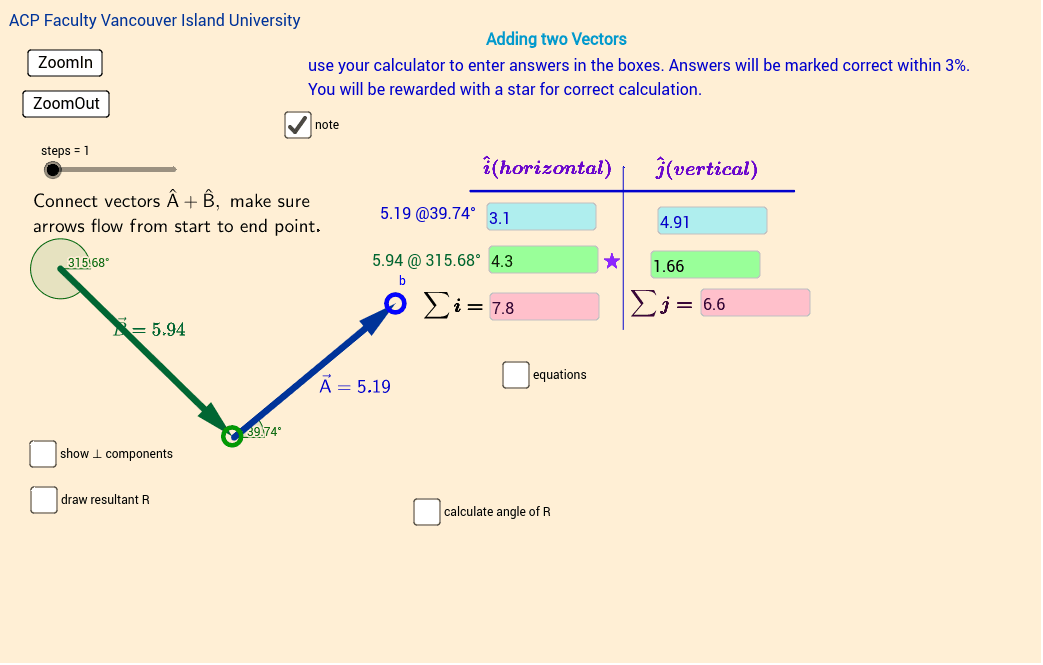
This example demonstrates the addition of two vectors in a 2D plane, visually illustrating the parallelogram law of vector addition through graphical representation. Key mathematical concepts involved include vectors, vector magnitude, vector angle, and analytical geometry representation. The construction utilizes GeoGebra commands and objects such as Circle, IsInRegion, Vector, Length, Angle, Segment, Textfield, and If. It is suitable for high school and above students studying vector operations, spatial imagination, and analytical geometry, as well as for physics teaching demonstrations in mechanics.
GeoGebra Commands & Parameters
Circle(b, 0.5) → regionAIsInRegion(c, regionA) → connectedABCircle(d, 0.5) → regionBIsInRegion(a, regionB) → connectedBAVector(c, d) → BLength(B) → magBAngle(Line[c, xAxis], Line[c, d]) → angleBVector(a, b) → AVector(a, (x(b), y(a))) → AiVector((x(b), y(a)), b) → AjAngle(Line[a, xAxis], Line[a, b]) → angleASegment(C, D) → fSegment(F, G) → gVector(c, (x(d), y(c))) → BiVector((x(d), y(c)), d) → By_1Length(A) → magATextfield(A_i) → inputAxTextfield(A_j) → inputAyTextfield(sumi) → sum_iTextfield(sumj) → sum_jTextfield(B_i) → InputBxTextfield(By) → InputByIf(connectedAB, a, If[connectedBA, c]) → RstartIf(connectedAB, d, If[connectedBA, b]) → RendVector(Rstart, Rend) → RvecVector(Rstart, (x(Rend), y(Rstart))) → RxVector(Rstart + (sumx, 0), Rend) → Ry
AI Drawing Prompt Reference
Draw a 2D vector addition demonstration showing the parallelogram law. Start by creating two circles and marking points inside them. Connect these points to form vectors, then calculate and display their lengths and angles. Use these vectors to construct a parallelogram and mark its diagonal as the vector sum. Finally, decompose the vectors into components along the axes and show their resultant addition.
The prompt above was compiled from the original drawing commands and is for reference only.