
Vasarely Cubes: Sequence and Circle Geometric Art
Loading the math board and drawing, please wait…
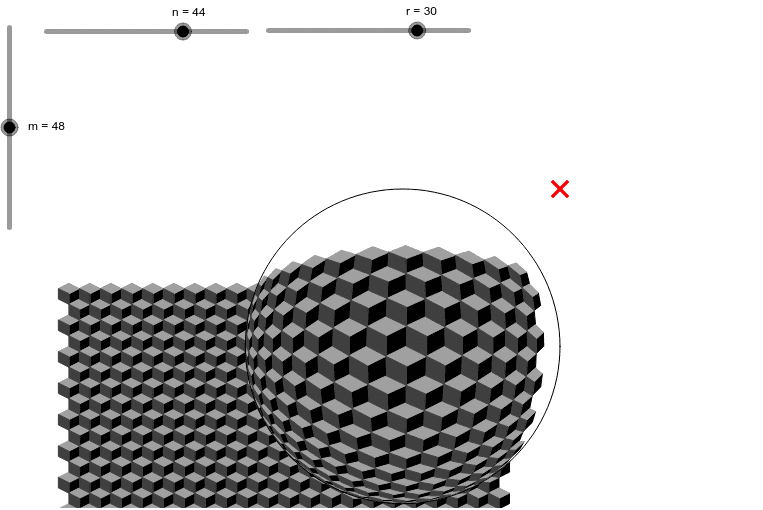
① This GeoGebra example demonstrates a geometric pattern inspired by Vasarely's optical art, where cubes and circles are arranged in a rhythmic sequence. ② Core mathematical concepts include sequences, circles, polygons, coordinate geometry, and the use of parameters to control positions and counts, with connections to quadratic equations and curve sketching. ③ Construction highlights: from the summary, the commands Sequence and Circle are used, with objects B, r, n, m, A, liste1, c, liste3, liste5, liste6, and liste4. The 'liste' objects likely store generated circles or cubes via sequence commands, while n and m control the number and spacing, creating a structured pattern. ④ Suitable for high school or early college students to explore sequence generation, geometric transformations, and the intersection of mathematics and art, as well as an introduction to programmatic geometric construction.
GeoGebra Commands & Parameters
Sequence(Sequence[(i, j), i, 2, (2 * n), 2], j, 1, m, 1) → liste1Circle(A, r) → cSequence(Sequence[If[Distance[Element[liste1, j, i], A] < r, Point[Segment[Element[liste1, j, i], ClosestPoint[c, Element[liste1, j, i]]], Distance[A, Element[liste1, j, i]] / r], Element[liste1, j, i]], i, 1, n], j, 1, m) → liste3Sequence(Sequence[Polygon[Element[liste3, j, i], Element[liste3, j + 1, i + 1], Element[liste3, j + 3, i + 1], Element[liste3, j + 2, i]], i, 2 + (1 + (-1)^(j)) / 2, n, 2], j, 1, m - 3, 3) → liste5Sequence(Sequence[Polygon[Element[liste3, j, i], Element[liste3, j + 1, i + 1], Element[liste3, j + 2, i], Element[liste3, j + 1, i - 1]], i, 2 + (1 + (-1)^(j)) / 2, n, 2], j, 3, m - 3, 3) → liste6Sequence(Sequence[Polygon[Element[liste3, j, i], Element[liste3, j + 1, i - 1], Element[liste3, j + 3, i - 1], Element[liste3, j + 2, i]], i, 2 + (1 + (-1)^(j)) / 2, n - 1, 2], j, 1, m - 3, 3) → liste4
AI Drawing Prompt Reference
Draw a geometric pattern inspired by Vasarely's optical art, featuring cubes and circles arranged in a rhythmic sequence. The core concepts involve sequences, circles, polygons, and coordinate geometry, with parameters controlling positions and counts. Begin by drawing a circle, then generate multiple circles and cubes based on sequences, and finally connect them to form polygons, creating a complex geometric structure with a structured pattern.
The prompt above was compiled from the original drawing commands and is for reference only.