
Variable Rectangle
Loading the math board and drawing, please wait…
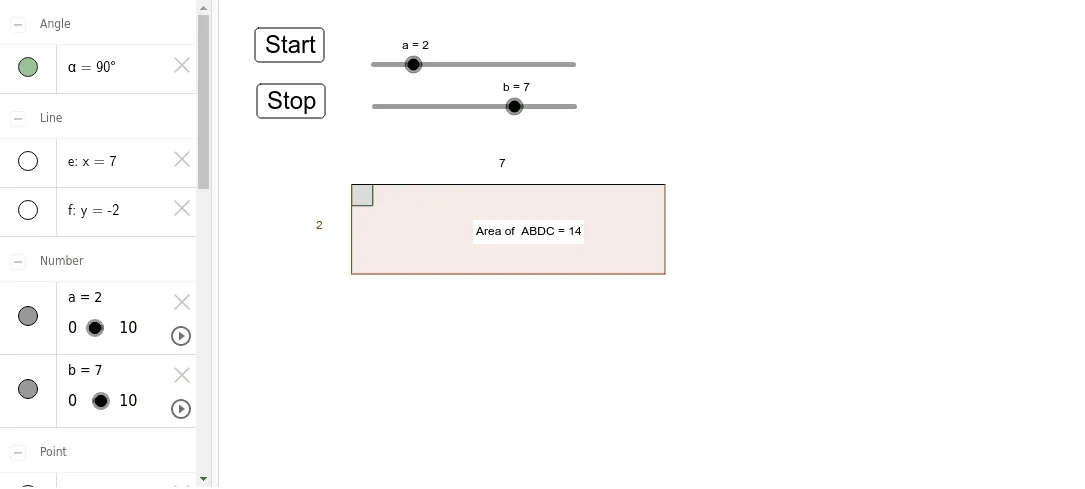
This example demonstrates a rectangle whose dimensions vary dynamically through parameter sliders, visualizing how shape and position change in real time. The core mathematics involve rectangle geometry, vector representation of sides, parametric curves, and exponential functions governing side lengths. The construction uses GeoGebra commands such as Point, Segment, Angle, OrthogonalLine, Intersect, Polygon, and PointIn, together with objects a, b, A, B, etc., to define vertices, compute angles, and generate the dynamic polygon poly1. Interactive buttons button1 and button2 allow resetting and toggling display modes. Designed for high‑school geometry and pre‑calculus students, it also serves as an introductory modeling tool in university courses.
GeoGebra Commands & Parameters
Point(Circle[A, a]) → BSegment(A, B) → cPoint(Circle[A, b]) → CSegment(A, C) → dAngle(B, A, C) → αOrthogonalLine(C, d) → eOrthogonalLine(B, c) → fIntersect(e, f) → DPolygon(A, B, D, C) → poly1, a_1, b_1, d_1, c_1PointIn(poly1) → Pointpoly1