
Variable Parallelogram: Condition for Rectangle or Rhombus
Loading the math board and drawing, please wait…
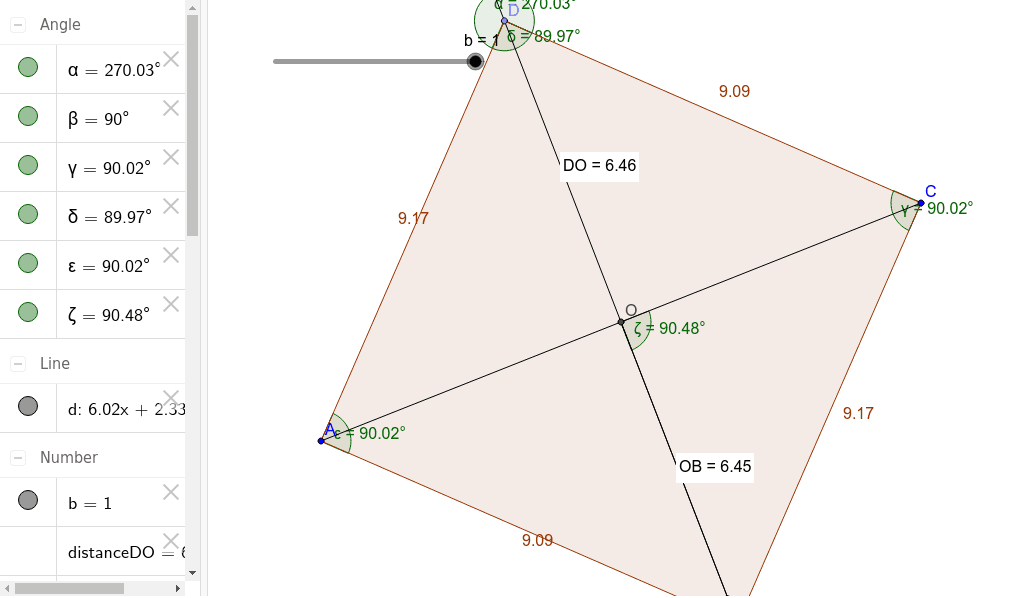
This example demonstrates how to determine whether a parallelogram becomes a rectangle or a rhombus by adjusting its parameters. The key mathematical concepts include parallelogram, rectangle, rhombus, and geometric properties. Construction involves using GeoGebra commands such as Segment, Midpoint, Point, Line, Distance, Polygon, and Angle to create the parallelogram and calculate distances and angles. Suitable for middle or high school mathematics to understand geometric transformations and properties.
GeoGebra Commands & Parameters
Segment(A, C) → aMidpoint(a) → OPoint(Circle[O, abs(((a * b)) / 2)]) → BSegment(O, B) → cLine(O, B) → dPoint(d) → DDistance(O, B) → distanceOCDistance(D, O) → distanceDOPolygon(B, C, D, A) → poly1, b_1, c_1, d_1, a_1Angle(C, D, A) → αAngle(poly1) → β, γ, δ, εAngle(d, a) → ζDistance(a_1, c_1) → e
AI Drawing Prompt Reference
Draw a parallelogram that can be adjusted to become a rectangle or a rhombus, highlighting its geometric properties. Start by drawing two parallel line segments, find the midpoint of one segment, and locate a point on a circle centered at this midpoint with a radius equal to half the length of the segment. Connect this point to the vertices of the parallelogram to form a new shape. Measure and label key angles and side lengths, emphasizing the properties of rectangles and rhombuses with different colors.
The prompt above was compiled from the original drawing commands and is for reference only.