
Variable Parabola String Art
Loading the math board and drawing, please wait…
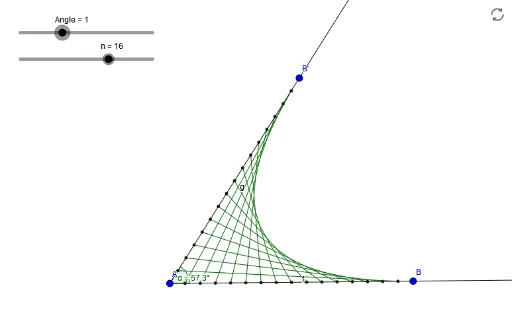
This example demonstrates the creation of a variable parabola string art by dynamically rotating line segments. It involves core mathematical concepts like parabolas, power functions, rotation angles, and coordinate geometry. The construction utilizes GeoGebra commands such as Ray, Rotate, Angle, and Sequence, with parameters A, B, f, α, n to control the dynamic changes. Suitable for high school and above students to explore parabolic properties and dynamic geometric constructions.
GeoGebra Commands & Parameters
Ray(A, B) → fRotate(B, Angle, A) → B'Angle(B, A, B') → αRay(A, B') → gSequence(A + (i / n * (B - A)), i, 1, n) → list_{AB}Sequence(A + (i / n * (B' - A)), i, 1, n) → list_{AB'}Sequence(Segment[Element[list_{AB}, i], Element[list_{AB'}, n - i]], i, 1, n) → line01
AI Drawing Prompt Reference
Create a variable parabola string art by dynamically rotating line segments. First, draw a ray f through points A and B. Then, rotate point B around A to get point B', and calculate the rotation angle α. Next, draw a ray g through points A and B'. Use points A and B to generate n evenly spaced points, and use points A and B' to generate another set of n evenly spaced points. Finally, connect these points to form a series of line segments, creating the parabola string art.
The prompt above was compiled from the original drawing commands and is for reference only.