
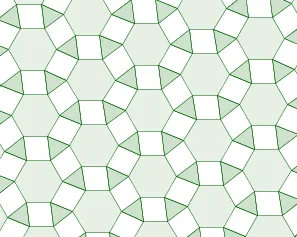
Variable Animation of Equilateral Triangles, Squares, and Regular Hexagons Tesse
Loading the math board and drawing, please wait…
This example demonstrates how equilateral triangles, squares, and regular hexagons tessellate on a plane, with a variable animation to show dynamic changes. Key math concepts include polygon tessellation, geometric transformations, angle calculations, and vector operations. Construction highlights from the GeoGebra command summary involve commands like Point, Intersect, Polygon, Circle, Rotate, Line, Vector, Sequence, and Angle. Suitable for high school mathematics education, it visually illustrates geometric transformations and combinations, enhancing understanding of polygon properties and tessellation principles.
GeoGebra Commands & Parameters
Point(xAxis) → BIntersect(xAxis, yAxis) → OOPolygon(OO, B, 6) → poly1, b, F, c, d, e, f, g, C, D, ECircle(C, B) → pCircle(OO, B) → hIntersect(p, h) → I, J, ,Rotate(I, (-rot), OO) → I'Polygon(A, OO, 3) → poly2, i, j, k, HRotate(poly2, α, J) → poly2'Rotate(poly2', α, J) → poly2''Rotate(poly2'', α, J) → poly2'''Rotate(poly2''', α, J) → poly3Rotate(poly3, α, J) → poly3'Line(OO, B) → aRotate(H, α, J) → H'Vector(E, A) → uSequence(Translate[ListPoly, Vector[(n * u)]], n, (-k2), k2) → ListRow1Vector(H, C) → vSequence(Translate[ListRow1, Vector[(n * v)]], n, (-k2), k2) → ListGridAngle(A, OO, B) → βAngle(A, OO, B) → γ