
Using Symmetry to Show Congruence
Loading the math board and drawing, please wait…
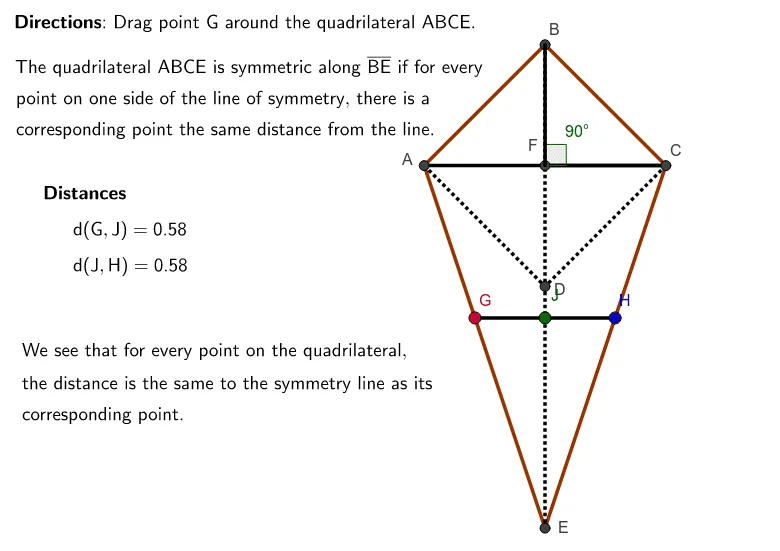
This example demonstrates how to prove congruence between two shapes by drawing a line of symmetry. It involves core math concepts like congruence, symmetry, prism, circumcircle or circumscribed circle, solids or 3D shapes, scatter plot, and rhombus. The construction uses commands and objects such as Intersect, Polygon, Segment, Point, and Angle in GeoGebra. It is suitable for high school students learning geometric proofs.
GeoGebra Commands & Parameters
Intersect(b, e) → AIntersect(a, f) → BIntersect(c, e) → CIntersect(f, g) → DIntersect(d, f) → EIntersect(e, f) → FPolygon(A, B, C, E) → poly1, a_1, b_1, c_1, e_1Segment(B, E) → hSegment(A, D) → iSegment(C, D) → jSegment(A, F) → kSegment(F, C) → lPoint(poly1) → GSegment(H, J) → mSegment(J, G) → nSegment(B, F) → pSegment(F, C) → qAngle(B, F, C) → α
AI Drawing Prompt Reference
Draw two symmetric shapes to prove their congruence using a line of symmetry. First, sketch two shapes, then identify and draw their line of symmetry. Mark key points and connect them with segments to form two congruent quadrilaterals. Finally, measure and label an angle in one quadrilateral to demonstrate symmetry and congruence.
The prompt above was compiled from the original drawing commands and is for reference only.