
Unit Circle
Loading the math board and drawing, please wait…
In collections
geometriadinamica.es
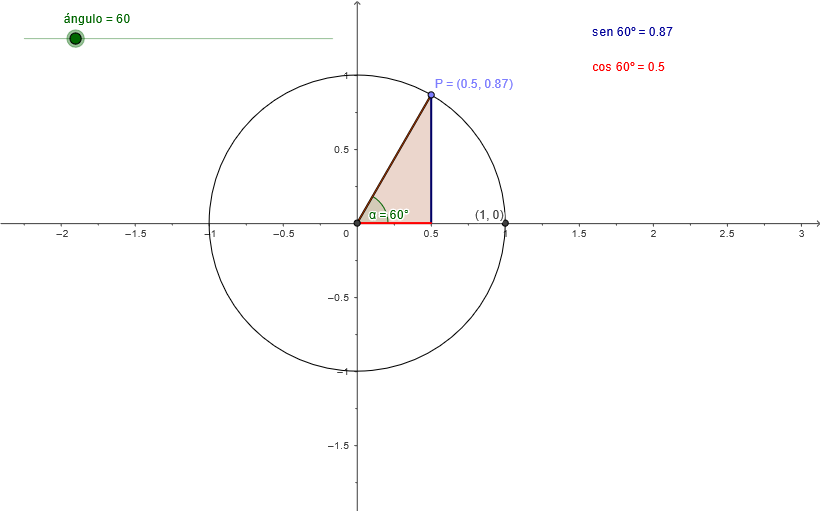
This example demonstrates the unit circle, involving core trigonometric concepts. Using GeoGebra commands such as Circle, Intersect, Rotate, Angle, etc., points on the unit circle and their corresponding sine and cosine values are constructed. Suitable for high school mathematics education, helping students understand the geometric meaning of trigonometric functions.
GeoGebra Commands & Parameters
Circle((0, 0), 1) → cIntersect(c, xAxis, 2) → AIntersect(xAxis, yAxis) → ORotate(A, (ángulo * pi / 180), O) → PAngle(A, O, P) → αSegment(P, O) → bSegment(P, (x(P), 0)) → senSegment((x(P), 0), O) → cosPolygon(P, O, (x(P), 0)) → Q, a, d, e
AI Drawing Prompt Reference
Draw a unit circle with points and corresponding sine and cosine values on it. The unit circle has its center at the origin and a radius of 1. Draw a vertical line from the origin to the unit circle, with the foot of the perpendicular at point A. Draw a vertical line from the origin to the x-axis, with the foot of the perpendicular at point O. Rotate point A by a certain angle to point P, with the angle being α. Draw a line segment from point P to the origin, draw a line segment from point P to the x-axis. Draw a vertical line segment from point P to the origin, draw a line segment from the x-coordinate of point P to the origin. Finally, draw a triangle with point P as the vertex.
The prompt above was compiled from the original drawing commands and is for reference only.