
Unit Circle Transformations
Loading the math board and drawing, please wait…
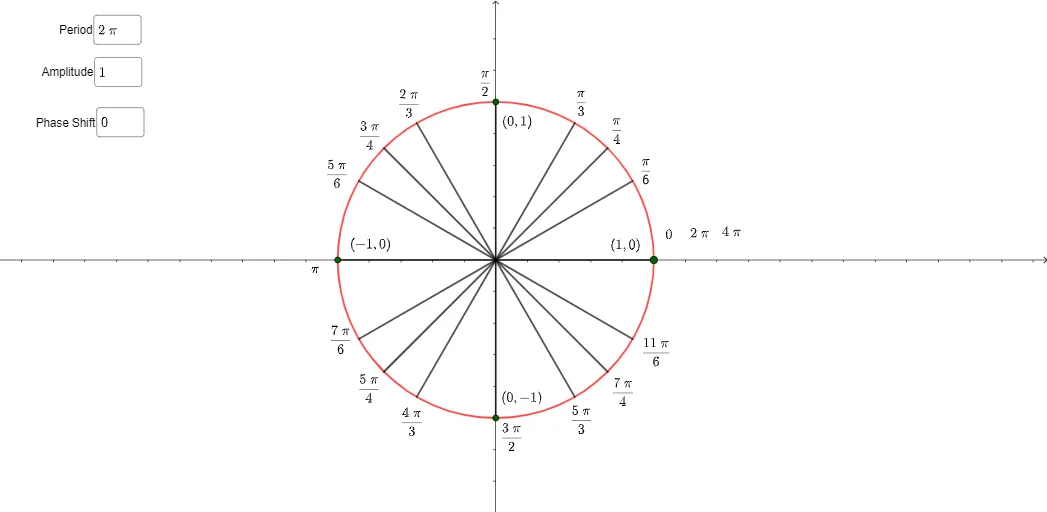
This example demonstrates transformations of trigonometric functions on the unit circle. Key mathematical concepts include trigonometric functions and the unit circle. Using GeoGebra commands such as Rotate, Angle, and Segment, dynamic displays of translations, stretches, and rotations of trigonometric functions are shown. Suitable for high school mathematics education and learning.
GeoGebra Commands & Parameters
Textfield(p) → InputBox1Textfield(b) → InputBox2Textfield(s) → InputBox3Rotate(A', 30°, A) → A''Angle(A', A, A'') → αSegment(A, A'') → gRotate(A', 45°, A) → A''_{1}Angle(A', A, A''_{1}) → βSegment(A, A''_{1}) → hRotate(A', 60°, A) → A''_{2}Angle(A', A, A''_{2}) → γSegment(A, A''_{2}) → iPoint(f) → DRotate(A', 120°, A) → A''_{3}Angle(A', A, A''_{3}) → δSegment(A, A''_{3}) → lRotate(A', 135°, A) → A''_{4}Angle(A', A, A''_{4}) → εSegment(A, A''_{4}) → mRotate(A', 150°, A) → A''_{5}Angle(A', A, A''_{5}) → ζSegment(A, A''_{5}) → nRotate(A', 180°, A) → A''_{6}Angle(A', A, A''_{6}) → ηSegment(A, A''_{6}) → qRotate(A', 90°, A) → A''_{7}Angle(A', A, A''_{7}) → θSegment(A, A''_{7}) → jRotate(A', 0°, A) → A''_{8}Angle(A', A, A''_{8}) → ιSegment(A, A') → kRotate(A', 210°, A) → A''_{9}Angle(A', A, A''_{9}) → κSegment(A, A''_{9}) → rRotate(A', 225°, A) → A''_{10}Angle(A', A, A''_{10}) → λSegment(A, A''_{10}) → tRotate(A', 240°, A) → A''_{11}Angle(A', A, A''_{11}) → μSegment(A, A''_{11}) → aRotate(A', 270°, A) → A''_{12}Angle(A', A, A''_{12}) → νSegment(A, A''_{12}) → cRotate(A', 300°, A) → A''_{13}Angle(A', A, A''_{13}) → ξSegment(A, A''_{13}) → dRotate(A', 315°, A) → A''_{14}Angle(A', A, A''_{14}) → οSegment(A, A''_{14}) → eRotate(A', 330°, A) → A''_{15}Angle(A', A, A''_{15}) → ρSegment(A, A''_{15}) → f_1Intersect(f, j, 1) → BPoint(f) → CIntersect(f, q, 1) → EIntersect(f, c, 1) → F
AI Drawing Prompt Reference
Draw a unit circle with center A and a point A' on the circle. From A, draw segments to A' and to points obtained by rotating A' around A by specific angles: 30°, 45°, 60°, 90°, 120°, 135°, 150°, 180°, 210°, 225°, 240°, 270°, 300°, and 315°. Label the angle between each segment and the initial radius. Place a movable point D on the circle. Include three input boxes for parameters p, b, and s to dynamically adjust transformations. The figure illustrates angle and segment relationships on the unit circle.
The prompt above was compiled from the original drawing commands and is for reference only.