
Unit Circle Tangent Reference Angles Construction
Loading the math board and drawing, please wait…
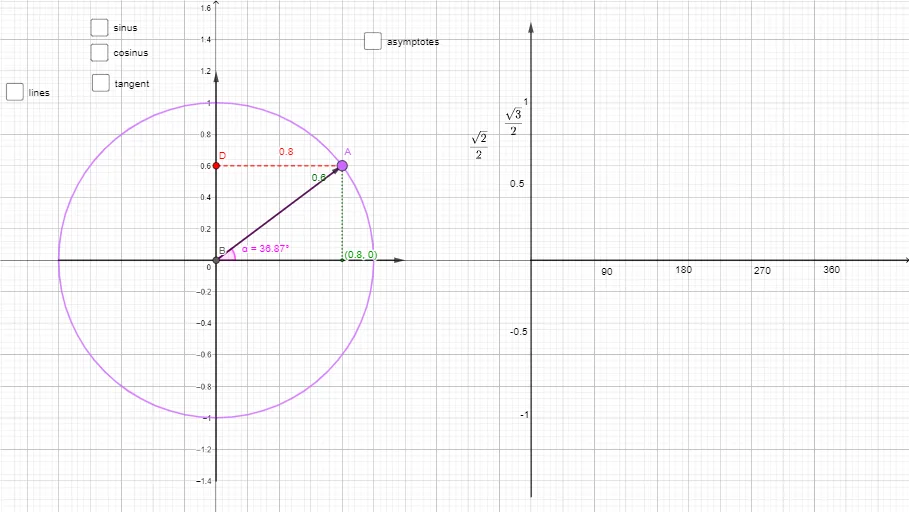
This example demonstrates how to construct and visualize reference angles using tangent directions on the unit circle, linking angles in different quadrants to a consistent reference-angle measure. It centers on key ideas: the unit circle, the definition and purpose of reference angles, quadrant-based angle interpretation, perpendicularity of tangent and radius, and the geometry behind right-triangle angle relationships. Construction-wise, it uses GeoGebra commands Point, Intersect, Segment, Angle, Vector, and Line to create the unit circle and key points, find intersection points that define the relevant rays, draw segments/lines that represent the tangent and associated directions, and measure/label multiple angles (e.g., using angle notation such as α and text labels for computed values like a or angle). Suitable for high-school through early undergraduate instruction in trigonometry and coordinate-geometry, helping learners understand sign patterns and compute trigonometric values via geometric reference angles.
GeoGebra Commands & Parameters
Point(c) → AIntersect(xAxis, yAxis) → BSegment(B, A) → fSegment(C, A) → gSegment(A, D) → hAngle(xAxis, f) → αPoint(xAxis) → HVector(H, J) → vVector(O, I) → uLine(A, D) → i_1Point(c) → PLine(P, Q) → j_1Line(A, B) → k_1Intersect(j_1, k_1) → RLine(S, R) → l_1Vector(L, K) → wVector(N, M) → iVector(B, A) → jVector(B, N) → kAngle(j, k) → βAngle(k, j) → γAngle(j, i) → δVector((0.9958195144018951, 0), R) → u_1
AI Drawing Prompt Reference
Draw a unit circle centered at the origin. Mark the intersections of the circle with the x-axis and y-axis. From the center, draw a radius making an angle α with the positive x-axis, and label its endpoint on the circle. At that endpoint, draw a tangent line to the circle, and extend it to intersect the x-axis. Choose another point on the circle, draw its tangent, and let it intersect the previous tangent line. Connect the center to this intersection point. Label several angles (α, β, γ, δ) using angle markers, and add vectors to indicate directions. Finally, annotate the diagram with text labels for the angle measures or symbols.
The prompt above was compiled from the original drawing commands and is for reference only.