
Unit Circle, Radians, and Degrees
Loading the math board and drawing, please wait…
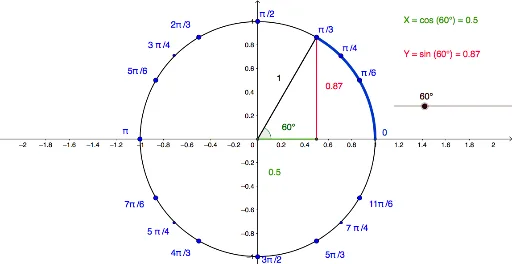
This GeoGebra example dynamically visualizes the relationship between angles, radians, and degrees on the unit circle, providing an intuitive foundation for trigonometric functions. The core mathematical concepts include the unit circle, conversion between radians and degrees, central angles, arc length, and the geometric interpretation of sine and cosine. Construction details: the Intersect command finds circle-axis intersections, Circle draws the unit circle, Segment connects radii, Angle marks the central angle, CircleArc draws the corresponding arc, and text objects (text1, text2) dynamically display radian and degree values. Suitable for high school students learning trigonometry and radian measure, as well as college preparatory review, this interactive tool helps learners grasp the intrinsic connection between angle measures and the unit circle.
GeoGebra Commands & Parameters
Intersect(xAxis, yAxis) → ACircle(A, B) → cSegment(D, E) → fSegment(A, E) → gSegment(A, D) → hAngle(C, A, D) → βIntersect(c, k, 2) → NCircleArc(A, N, F) → dCircleArc(A, N, D) → e
AI Drawing Prompt Reference
Draw a unit circle centered at the origin with radius 1. Place a movable point on the circle and connect it to the center with a radius segment. Draw another fixed radius from the center to a different point on the circle, forming a central angle between the two radii. Mark the arc corresponding to this angle, and label the angle in both radians and degrees. Show the intersections of the circle with the coordinate axes. The figure dynamically illustrates how the arc length and angle measure change together.
The prompt above was compiled from the original drawing commands and is for reference only.