
Unit Circle Point and Angle
Loading the math board and drawing, please wait…
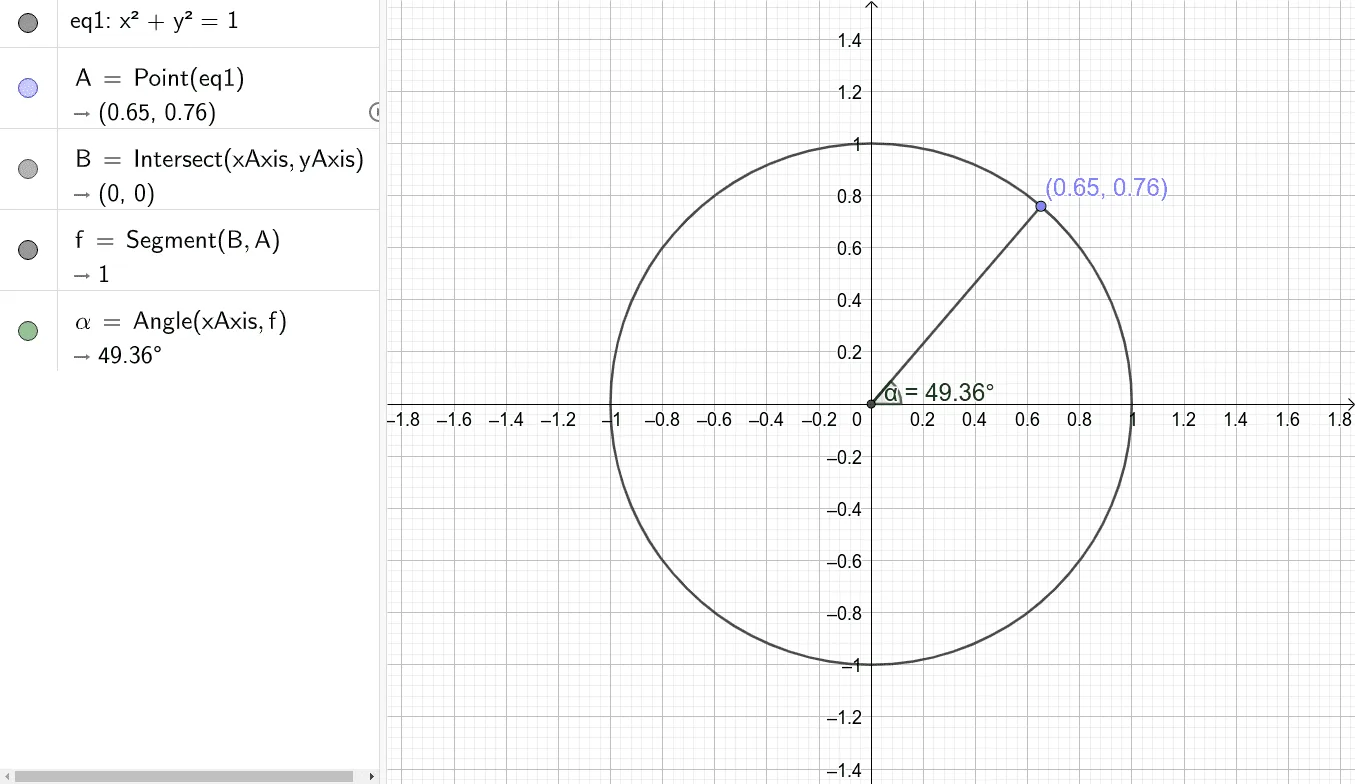
This GeoGebra applet demonstrates how a point moves on the unit circle as its central angle α changes. It visualizes the coordinates (cos α, sin α) of the point and shows the relationship between the angle and the trigonometric functions. The construction uses the commands Point, Intersect, Segment, and Angle: the unit circle is defined by equation eq1, point A is created on the circle, segment AB connects the origin to A, and angle α is measured. A slider can be adjusted to change α, allowing interactive exploration of the circular motion. This example is suitable for high‑school students learning trigonometry and coordinate geometry, and also serves as a visual aid for calculus lessons introducing derivatives of parametric functions.
GeoGebra Commands & Parameters
Point(eq1) → AIntersect(xAxis, yAxis) → BSegment(B, A) → fAngle(xAxis, f) → α
AI Drawing Prompt Reference
Draw a unit circle with a point moving along the circle as the angle changes. There is a point A on the circle, and a line segment from the center to A representing the angle α. The angle α starts at 0 degrees and changes, causing the line segment's length and direction to change. Show the relationship between point A's coordinates and the angle, and the connection between the unit circle and the angle.
The prompt above was compiled from the original drawing commands and is for reference only.