
Unit Circle Part 2: Geometric construction for trig correspondence
Loading the math board and drawing, please wait…
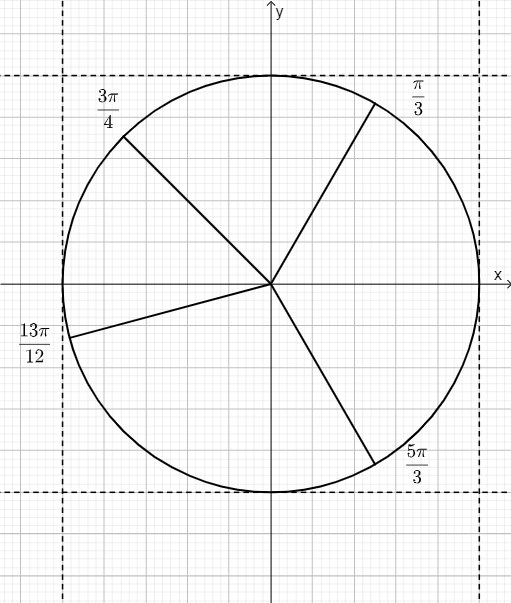
This example demonstrates how points on the unit circle correspond to an angle, and how the values of trigonometric functions can be read from a geometric construction involving projections and labeled relationships. The key mathematical ideas include the unit circle, the mapping between angle and the point on the circle, and the geometric meaning of sine and cosine (and related trig values) via coordinate positions. Construction highlights: the GeoGebra command Circle is used to create the unit circle object (c); the Zip command is then used to package and manage related objects such as lines (l1, l2) together with annotation elements (text1–text4), keeping the diagram organized and emphasizing the essential geometry and labels. Suitable for late secondary school through early university learners, for instruction and interactive exploration of trigonometry through geometric visualization.
GeoGebra Commands & Parameters
Circle((0, 0), 1) → cZip(Segment[(0, 0), (1; a)], a, {π / 3, (3 * π / 4), (13 * π / 12), (5 * π / 3)}) → l2
AI Drawing Prompt Reference
Draw a unit circle centered at the origin with radius 1. Next, for several specified angles—π/3, 3π/4, 13π/12, and 5π/3—construct the corresponding rays from the origin and represent each by a line segment from (0,0) toward the point determined by that angle (i.e., the ray direction relative to the unit circle). Arrange the segments so their directions visually match the given angles, emphasizing the correspondence between an angle and its geometric position related to the unit circle, with space for labeling the angles.
The prompt above was compiled from the original drawing commands and is for reference only.