
Unit Circle for Year 10
Loading the math board and drawing, please wait…
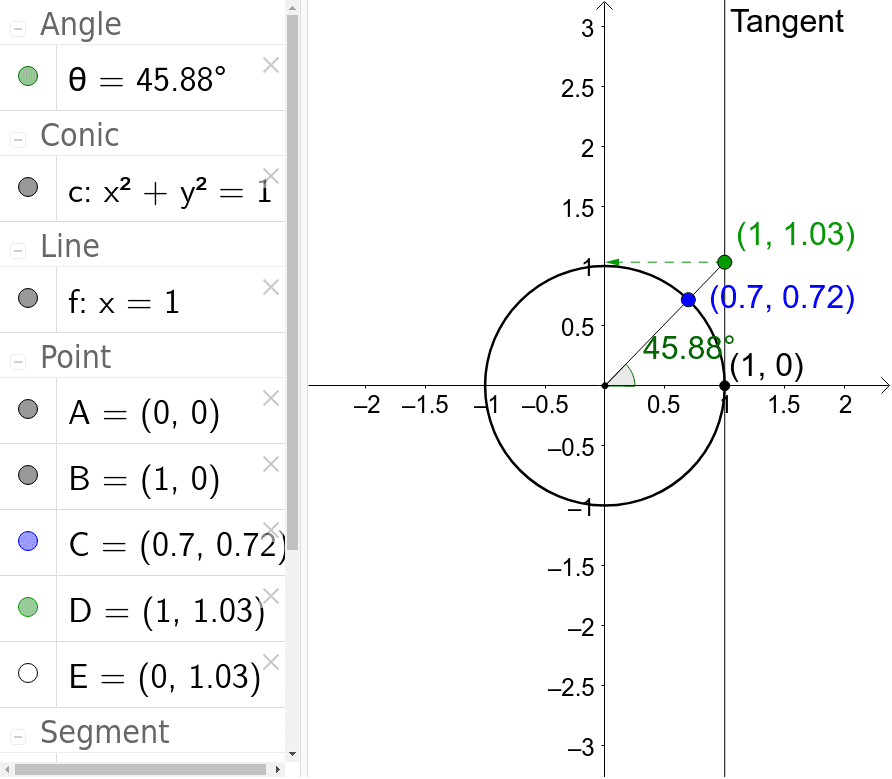
This example demonstrates the construction of the unit circle and its relationship with trigonometric functions. Key math concepts include the unit circle, trigonometric functions, angles, and vectors. It is constructed using GeoGebra commands like Intersect, Point, Circle, Tangent, Segment, Angle, and Vector. Suitable for Year 10 students to understand the geometric meaning of trigonometric functions and the unit circle.
GeoGebra Commands & Parameters
Intersect(xAxis, yAxis) → APoint(xAxis) → BCircle(A, B) → cTangent(B, c) → f,Point(c) → CSegment(A, C) → gSegment(C, D) → hAngle(B, A, C) → θVector(D, E) → u
AI Drawing Prompt Reference
Draw a unit circle and show its relationship with trigonometric functions. Start by plotting the intersection of the coordinate axes, then draw a circle with the intersection point as the center and the other axis point on the circle. Next, draw a tangent line from the circle point, and mark a point on the tangent. Connect the center to this point and draw another line from it. Label the angle formed by the center, circle point, and tangent point, and draw a vector from a certain point.
The prompt above was compiled from the original drawing commands and is for reference only.