
Unit Circle for Sine and Cosine
Loading the math board and drawing, please wait…
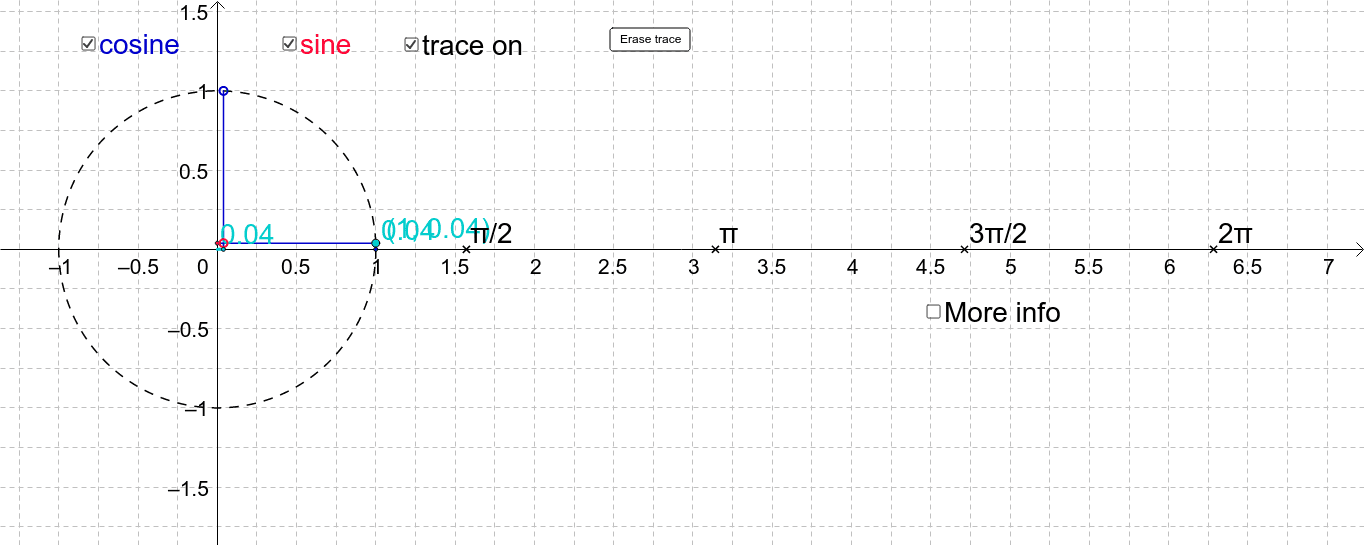
This GeoGebra example dynamically illustrates the geometric definitions of sine and cosine using the unit circle, showing how the coordinates of a point on the circle correspond to the trigonometric functions as the angle changes. Core mathematical concepts include the unit circle, trigonometric functions, angle measurement in radians, and periodicity. The construction uses commands such as Circle to draw the unit circle, Point to place a movable point on the circle, OrthogonalLine to create perpendiculars, Intersect to find intersection points, Segment to connect points, Polygon to form triangles, and Angle to mark the angle, with a slider (button1) to animate the angle and display coordinates. Suitable for high school students learning trigonometric definitions, or for college preparatory review, and useful for classroom demonstrations and self-study.
GeoGebra Commands & Parameters
Circle(A, B) → cPoint(c) → CCircleArc(A, B, C) → dOrthogonalLine(C, xAxis) → aOrthogonalLine(C, yAxis) → bIntersect(b, yAxis) → DSegment(C, D) → eIntersect(a, xAxis) → ESegment(C, E) → fOrthogonalLine(Y, xAxis) → gIntersect(g, xAxis) → FSegment(Y, F) → hSegment(X, F) → iSegment(A, F) → nPolygon(G, G2, G3) → poly1, g3, g_1, g2Angle(G2, G, G3) → α
AI Drawing Prompt Reference
Draw a unit circle centered at the origin with radius 1. Place a movable point on the circle, and draw a radius from the center to this point, marking the angle between the radius and the positive x-axis. From the point, drop perpendiculars to the x-axis and y-axis, and connect the feet to the point with segments, representing sine and cosine lengths. Also, on the x-axis, draw a segment from the origin to the right, and construct a right triangle above it with the radius as hypotenuse and legs parallel to the axes. Use a slider to animate the point on the circle, showing how sine and cosine values change with the angle.
The prompt above was compiled from the original drawing commands and is for reference only.