
Unit Circle Exploration by Barbara E Jones (4)
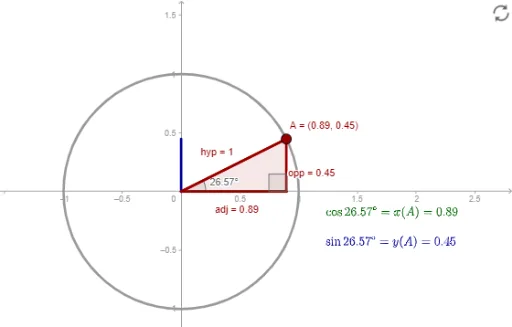
Loading the math board and drawing, please wait…
This example demonstrates how a point on the unit circle moves as the angle changes. Key mathematical concepts include the unit circle, trigonometric functions, angles, and triangles. Using GeoGebra commands such as Intersect, Point, Circle, Angle, and Polygon, it visually illustrates sine and cosine values. Suitable for middle school and above students to learn trigonometry and geometric construction.
GeoGebra Commands & Parameters
Intersect(xAxis, yAxis) → OPoint(xAxis) → BCircle(O, B) → cPoint(c) → AAngle(B, O, A) → αPolygon(O, C, A) → poly1, adj, opp, hypSegment(O, S) → sinαSegment(O, C) → cosαSegment(A, O) → aAngle(A, C, O) → β
AI Drawing Prompt Reference
Draw a unit circle with its center at the origin and radius 1. Draw a horizontal line segment OB from the origin. Then, draw a circle c with O as the center and OB as the radius. Choose a point A on circle c and draw line segments OA and OB to form angle α. Next, draw a vector from O to A to represent sinα, and another vector from O to C to represent cosα. Finally, draw a triangle with vertices O, C, and A to illustrate the trigonometric relationships.
The prompt above was compiled from the original drawing commands and is for reference only.