
Unit Circle Coordinate Calculator
Loading the math board and drawing, please wait…
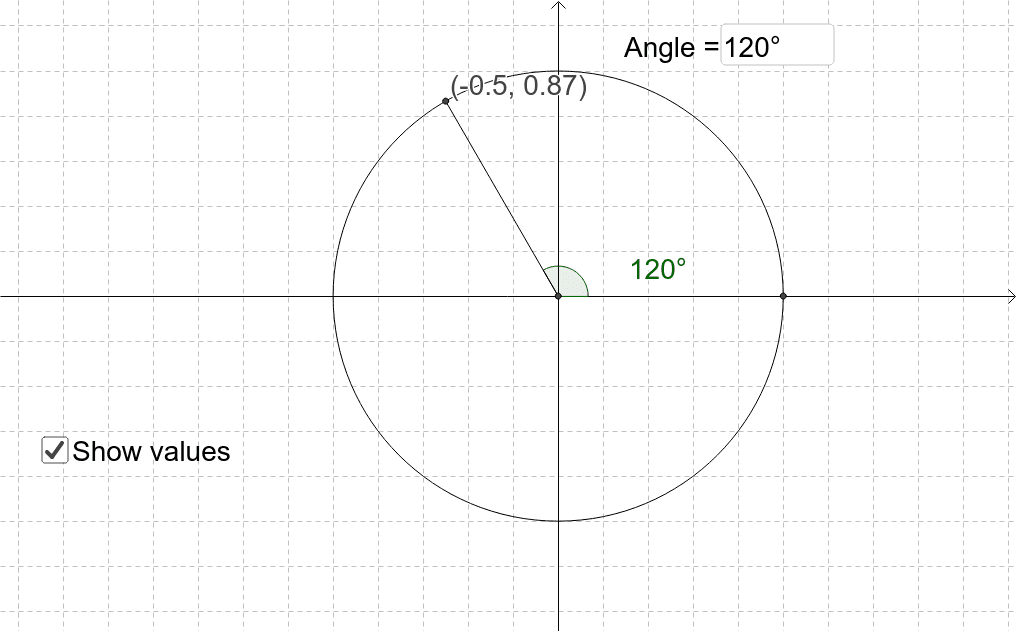
This applet calculates and displays (x, y) coordinates on a unit circle for given angles. Key math concepts include trigonometry and coordinate geometry. It uses commands like Intersect, Circle, Rotate, Angle, Segment, and Textfield. Suitable for middle school and above students.
GeoGebra Commands & Parameters
Intersect(xAxis, yAxis) → ACircle(A, 1) → cIntersect(c, xAxis, 2) → BRotate(B, α, A) → B'Angle(B, A, B') → βSegment(A, B') → aTextfield(α) → inputBox1
AI Drawing Prompt Reference
Draw a unit circle and mark the intersection point of the x-axis and y-axis. From this point, draw a circle with radius 1 to find another intersection point B with the x-axis. Given an angle α, rotate point B around the origin by angle α to get point B'. Connect the origin to B' and label the angle α and the formed angle β. Add a text box next to the diagram for inputting the angle α value.
The prompt above was compiled from the original drawing commands and is for reference only.