
Unit Circle: Complementary Angles
Loading the math board and drawing, please wait…
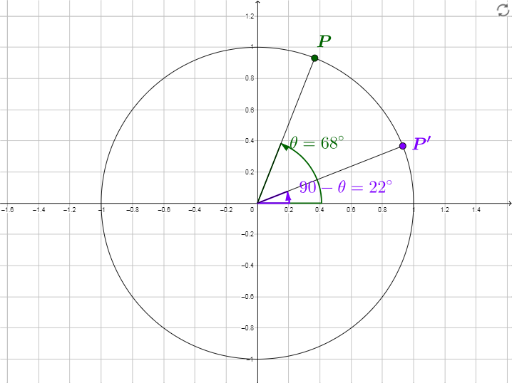
This GeoGebra example demonstrates the geometric properties of complementary angles on the unit circle. When two angles are complementary, meaning their sum is 90 degrees, the corresponding points on the unit circle exhibit symmetry, revealing the co-function identities of sine and cosine. Key mathematical concepts include the unit circle, complementary angles, trigonometric functions (sine and cosine), and angle relationships. Construction highlights involve using commands like Circle to draw the unit circle, Point to define points such as the center O and point P on the circle, Angle to measure angle θ, Segment to draw radii or chords, Rotate to generate the point P' for the complementary angle, and Midpoint for auxiliary constructions. Objects like O, c, P, A, θ, a, P', text1, B, b, C, text2, α, β, text3, text4 work together to create a dynamic visualization. This example is suitable for high school or introductory college students learning trigonometry, and for teachers in instructional settings.
GeoGebra Commands & Parameters
Circle(O, 1) → cPoint(c) → PAngle(A, O, P) → θSegment(O, P) → aRotate(A, 90° - θ) → P'Midpoint(a) → BSegment(O, P') → bMidpoint(b) → CAngle(P', O, A) → αAngle(A, O, P') → β