
Unit Circle and Trig Functions by Craig Adelhardt
Loading the math board and drawing, please wait…
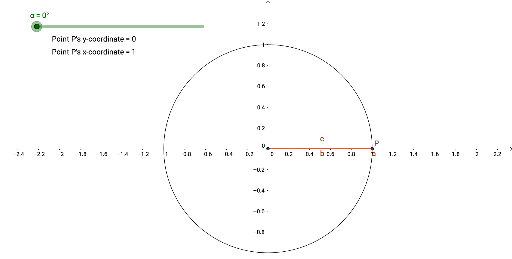
This GeoGebra example dynamically demonstrates the relationship between the unit circle and trigonometric functions (sine, cosine) as the angle changes, linking geometric definitions to function graphs. Core math concepts include the unit circle, trigonometric ratios, angle rotation, right-triangle side relationships, and function graph transformation. Construction highlights: uses GeoGebra commands such as Intersect, Circle, Rotate, Angle, OrthogonalLine, and Polygon, with objects like A, c_2, α, D, D', β, f, B, poly1, c, b, a, C, g, SinY, CosX, P, text1, and text2. A slider or draggable point controls the angle, updating the trigonometric values and corresponding graphs in real time. Suitable for high school trigonometry, pre-calculus review, and exploratory learning of geometry-function connections.
GeoGebra Commands & Parameters
Intersect(xAxis, yAxis) → ACircle(A, 1) → c_2Intersect(c_2, xAxis, 2) → DRotate(D, α, A) → D'Angle(D, A, D') → βOrthogonalLine(D', xAxis) → fIntersect(f, xAxis) → BPolygon(D', A, B) → poly1, c, b, aIntersect(c_2, c, 1) → CIntersect(c_2, c, 1) → P
AI Drawing Prompt Reference
Draw a unit circle centered at the origin with radius 1. Place a movable point on the circle, determined by a ray from the center whose angle is adjustable via a slider or draggable point. From this point, drop a perpendicular to the horizontal axis, marking the foot on the axis, forming a right triangle with legs along the horizontal and vertical directions. Label the angle at the center and show the horizontal and vertical projections of the point, representing cosine and sine values respectively. Additionally, plot two function graphs outside the circle: one showing sine versus angle and the other showing cosine versus angle, both updating in real time as the point moves.
The prompt above was compiled from the original drawing commands and is for reference only.