
Two-Dimensional Standing Wave on a Disk by Roman Chijner
Loading the math board and drawing, please wait…
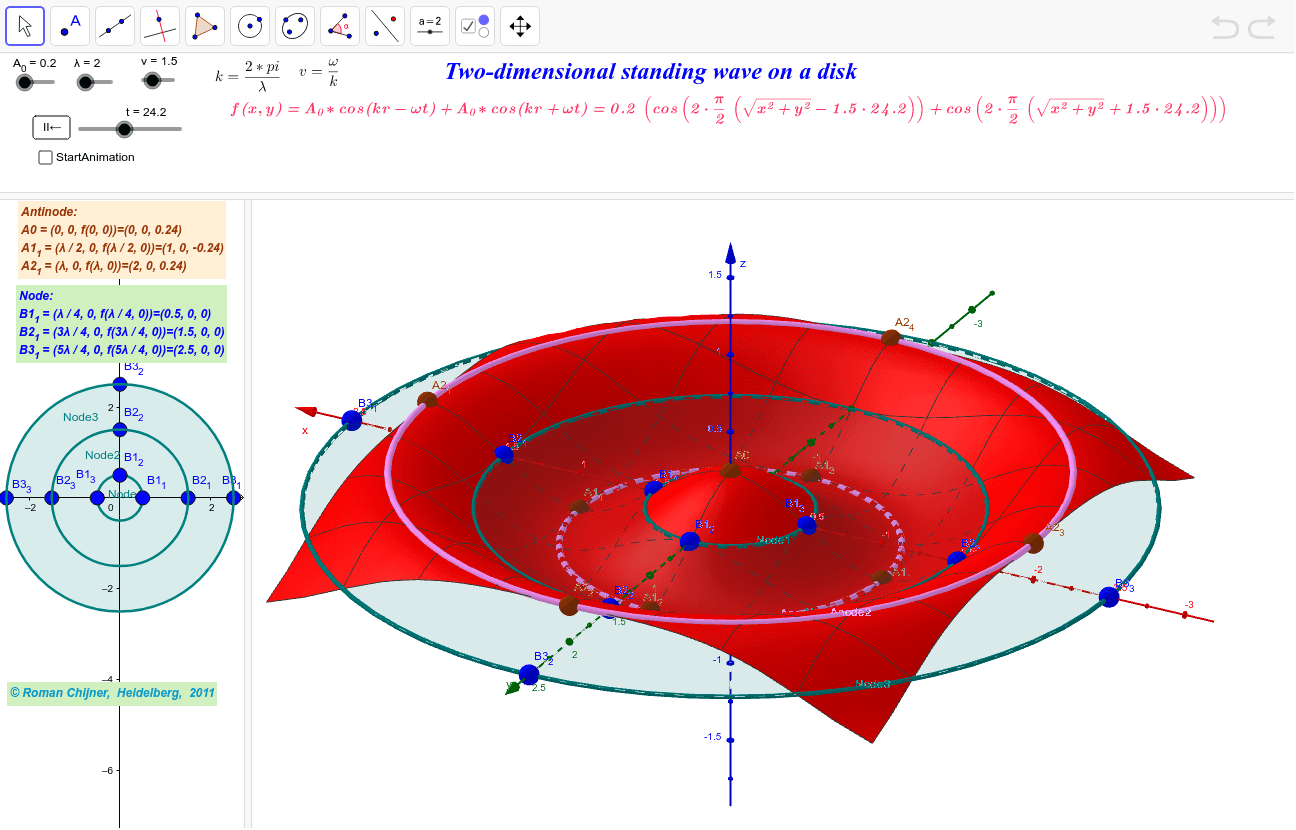
This GeoGebra example demonstrates a two-dimensional standing wave on a disk with fixed circular boundary, visually showing the distribution of nodal lines and antinodes across different vibrational modes. The core mathematical concepts include circular geometry, trigonometric functions (sine and cosine), the wave equation, parametric equations, and the physical interrelations among wavelength λ, frequency f, wave speed v, and time t. Construction highlights: the Circle command defines the disk boundary, while the Function command expresses the standing wave profile; slider objects λ, t, v, and f provide dynamic parameter control, and point objects such as A_0, A1_*, A2_*, B1_*, B2_*, B3_* mark node locations, supplemented by Text labels and a Schaltfläche button for interactive operation. Suitable for high school physics and mathematics electives, university general physics, acoustics fundamentals, engineering mathematics, and independent inquiry into wave phenomena.
GeoGebra Commands & Parameters
Function((A_0 * (cos(((2 * π / λ) * (sqrt(x^(2) + y^(2)) - (v * t)))) + cos(((2 * π / λ) * (sqrt(x^(2) + y^(2)) + (v * t)))))), -2, 2, -2, 2) → fCircle(A1_1, A1_2, A1_4) → Anode1Circle(A2_1, A2_2, A2_3) → Anode2Circle(B2_1, B2_2, B2_3) → Node2Circle(B3_1, B3_2, B3_3) → Node3Circle(B1_1, B1_2, B1_3) → Node1
AI Drawing Prompt Reference
Draw a two-dimensional standing wave on a disk, including the disk boundary, wave profile, and nodes and antinodes. First, draw a circle as the disk boundary, then use trigonometric functions to draw the standing wave profile, and adjust the wavelength, speed, time, and frequency using sliders. Finally, mark the positions of nodes and antinodes on the wave profile.
The prompt above was compiled from the original drawing commands and is for reference only.