
TS.3 Dilations Create Similar Figures #1
Loading the math board and drawing, please wait…
In collections
SWW TS.3 Dilations Create Similar Figures
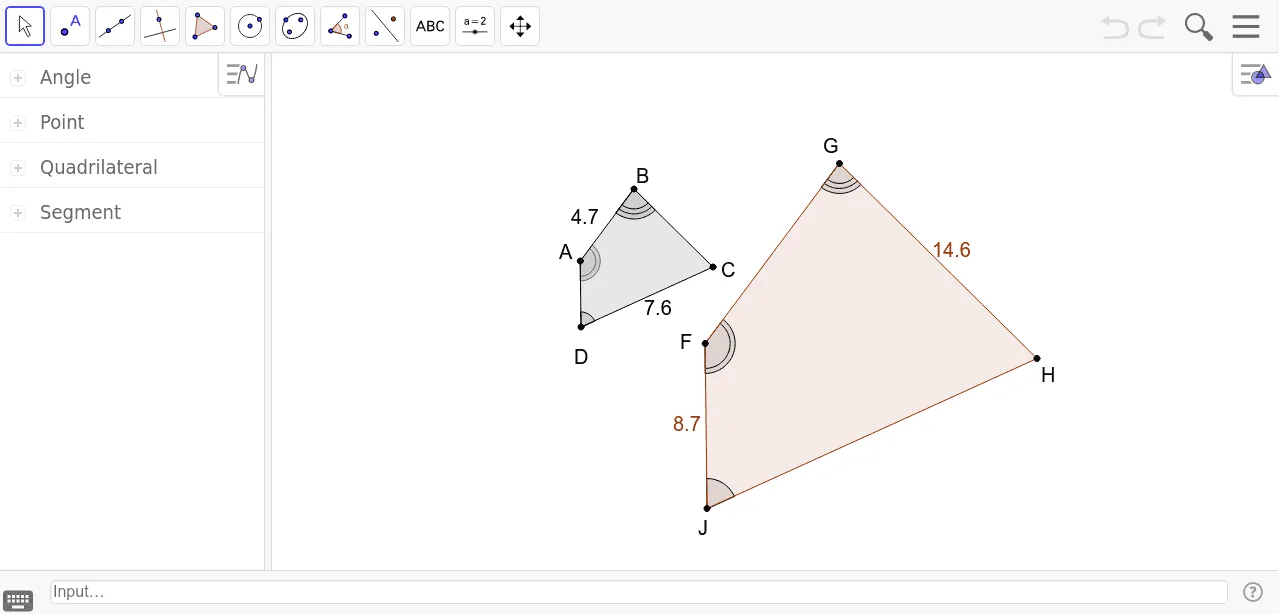
This example demonstrates how to create similar figures by applying a dilation transformation to a polygon, enlarging or reducing it while preserving shape. The core mathematical concepts include dilation, similarity, and the properties of the center of dilation. Construction highlights: the original polygon is drawn using the Polygon command, then transformed with the Dilate command; Angle command is used to mark angles and verify corresponding angles are equal. Students locate the center of dilation X by drawing lines through pairs of corresponding vertices)Skip and measure side lengths to compare ratios. This resource is suitable for middle or high school geometry lessons on similarity and transformations, and can be used to explore how the scale factor affects the size of the image.
GeoGebra Commands & Parameters
Polygon(A, B, C, D) → poly1, a, b, c, dDilate(A, 2.5, E) → FDilate(B, 2.5, E) → GDilate(C, 2.5, E) → HDilate(D, 2.5, E) → JAngle(A, D, C) → αAngle(B, A, D) → δPolygon(F, G, H, J) → poly2, a'_1, b'_1, c'_1, d'_1Angle(A, B, C) → βAngle(H, J, F) → γAngle(J, F, G) → εAngle(F, G, H) → ζ