
Isosceles Trapezoid Construction and Properties by Debra Schneider
Loading the math board and drawing, please wait…
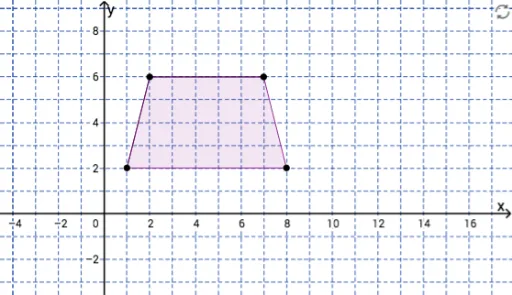
This GeoGebra example demonstrates the dynamic construction of an isosceles trapezoid, highlighting its symmetry and equal-leg properties through interactive geometry tools. The core mathematical concepts include the definition of an isosceles trapezoid (equal legs, equal base angles), axial symmetry, and polygon attributes. Construction steps: use Segment to create bases and legs, Line for auxiliary lines, Intersect to find intersection points, OrthogonalLine for perpendiculars, Mirror for reflection symmetry, and Polygon to form the closed shape. Key objects include points A, B, C, D and reflected D', lines f, g, h, i, and sides a, b, c, d'. This example is suitable for middle school geometry lessons on trapezoid properties and for high school demonstrations of symmetry transformations in coordinate geometry.
GeoGebra Commands & Parameters
Segment(A, B) → fSegment(B, C) → gLine(A, g) → hLine(C, f) → iIntersect(h, i) → DOrthogonalLine(C, g) → jMirror(D, j) → D'Polygon(B, C, D', A) → poly1, b, c, d', a
AI Drawing Prompt Reference
Draw an isosceles trapezoid. Start with a base segment and one leg. From one endpoint of the base, draw a line parallel to the leg; from the other endpoint of the leg, draw a line parallel to the base. These two lines intersect to form the fourth vertex. Then, construct a perpendicular line through the leg's other endpoint to that leg, and reflect the fourth vertex across this perpendicular to get a mirrored point. Finally, connect the two base endpoints, the leg's endpoint, and the mirrored point with segments to form a closed quadrilateral. The shape should have equal legs and symmetry, with the top and bottom bases parallel.
The prompt above was compiled from the original drawing commands and is for reference only.