
Truncated Tetrahedron: 3D Construction and Geometric Analysis
Loading the math board and drawing, please wait…
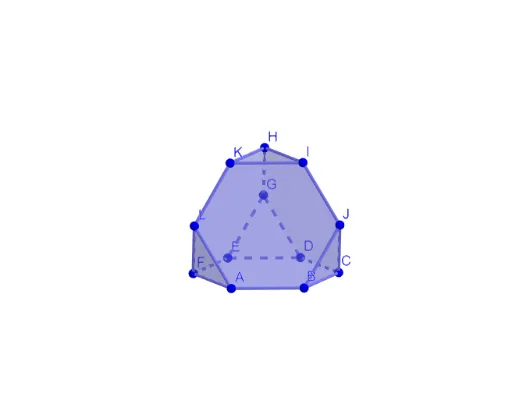
① This GeoGebra example demonstrates the construction of a truncated tetrahedron, a semi-regular polyhedron obtained by cutting off the vertices of a regular tetrahedron, and visualizes its faces, edges, and vertices in 3D. ② Core mathematical concepts include solid geometry, polyhedra, regular tetrahedron, truncation, symmetry, and the interplay of planes and solids; it involves basic geometric elements such as polygons, circles, lines, perpendiculars, angles, and midpoints. ③ Construction highlights: from the summary, the commands used are Circle, Intersect, Rotate, Polygon, Line, OrthogonalLine, Angle, and Midpoint; objects include multiple points (A, B, C, D, E, F, etc.), multiple polygons (veelhoek1 to veelhoek4), and auxiliary lines (a, b, c_1, d, e, f, etc.). The construction uses rotation and intersection to generate new vertices after truncation, then connects them to form faces. ④ Suitable for high school or early college solid geometry lessons, as well as mathematical modeling or computer-aided geometric design, helping students intuitively understand polyhedron construction and spatial transformations.
GeoGebra Commands & Parameters
Circle(OO, 1, xOyPlane) → cIntersect(yAxis, c, 2) → ARotate(A, 60°) → BRotate(A, 120°) → CRotate(A, 180°) → DRotate(A, 240°) → ERotate(A, 300°) → FPolygon(A, B, C, D, E, F) → veelhoek1, a, b, c_1, d, e, fPolygon(B, A, 6, xOyPlane) → veelhoek2, g, J_1, h, i, j, k, l, G_1, H_1, I_1Polygon(D, C, 6, xOyPlane) → veelhoek3, m, N, n, p, q, r, s, K_1, L_1, MPolygon(F, E, 6, xOyPlane) → veelhoek4, t, R, f_1, g_1, h_1, i_1, j_1, O, P, QCircle(c_1, K_1) → d_1Circle(a, J_1) → e_1Intersect(e_1, d_1) → J, T, ,Line(D, C) → k_1OrthogonalLine(K_1, k_1, xOyPlane) → l_1Intersect(k_1, l_1) → KKAngle(K_1, KK, J) → αRotate(veelhoek3, (-α), c_1) → veelhoek3'Line(OO, OOO) → asRotate(veelhoek3', 120°, as) → veelhoek3''Rotate(veelhoek3', (-(120°)), as) → veelhoek3''_1Rotate(J, (-(120°)), as) → LRotate(J, 120°, as) → GMidpoint(L, J) → UOrthogonalLine(U, veelhoek3''_1) → mmRotate(J, (-(60°)), mm) → IRotate(I, 120°, as) → HRotate(I, (-(120°)), as) → KPolygon(D, E, G) → driehoek1, s'_1, d_2, e_2Rotate(driehoek1, 120°, as) → driehoek1'Rotate(driehoek1, (-(120°)), as) → driehoek1'_1