
Triplets Geometric Construction
Loading the math board and drawing, please wait…
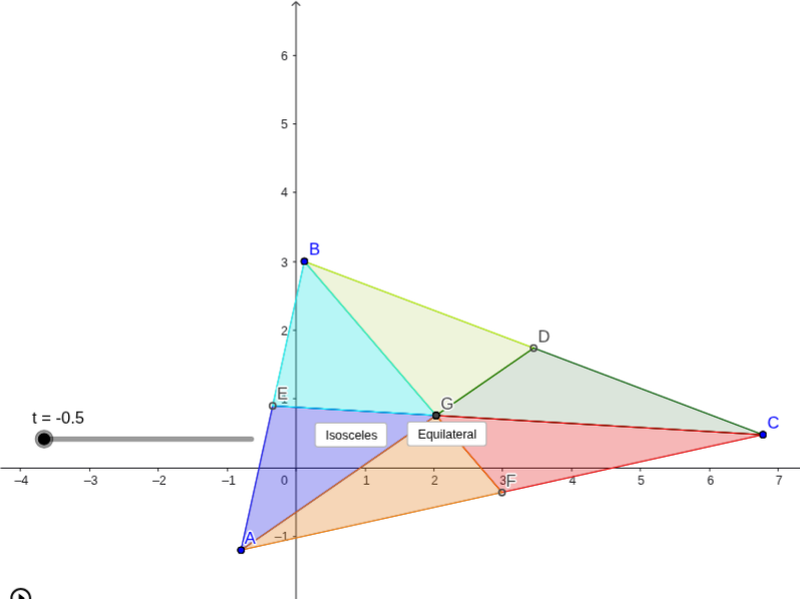
This example demonstrates the process of constructing specific geometric patterns through the creation of three triangles and their reflections. It involves core mathematical concepts such as congruence, geometric reflection, rotation, midpoint construction, and symmetry. The construction utilizes GeoGebra commands and objects like Polygon, Midpoint, Segment, Intersect, Rotate, Angle, Line, Mirror, and Circle. It is suitable for high school mathematics education, helping students understand the application of geometric transformations and symmetry in constructing complex figures.
GeoGebra Commands & Parameters
Polygon(A, B, C) → poly1, c, a, bMidpoint(a) → DMidpoint(c) → EMidpoint(b) → FSegment(A, D) → dSegment(B, F) → eIntersect(d, e) → GPolygon(B, E, G) → poly2, g, b_1, e_1Polygon(B, G, D) → poly3, d_1, b_2, g_1Polygon(D, G, C) → poly4, c_1, d_2, g_2Polygon(F, G, C) → poly5, c_2, f_1, g_3Polygon(F, G, A) → poly6, a_1, f_2, g_4Polygon(A, E, G) → poly7, g_5, a_2, e_2Rotate(B, ((-f(t)) * Angle[B, D, G]), D) → B'Rotate(G, ((-f(t)) * Angle[B, D, G]), D) → G'Rotate(D, ((-f(t)) * Angle[B, D, G]), D) → D'Polygon(B', G', D') → poly3', d', b', g'Rotate(D, (f(t) * Angle[G, D, C]), D) → D'_1Rotate(G, (f(t) * Angle[G, D, C]), D) → G'_1Rotate(C, (f(t) * Angle[G, D, C]), D) → C'Polygon(D'_1, G'_1, C') → poly4', c', d'_1, g'_1Rotate(F, ((-f(t)) * Angle[C, F, G]), F) → F'Rotate(G, ((-f(t)) * Angle[C, F, G]), F) → G'_2Rotate(C, ((-f(t)) * Angle[C, F, G]), F) → C'_1Polygon(F', G'_2, C'_1) → poly5', c'_1, f', g'_2Rotate(F, (f(t) * Angle[G, F, A]), F) → F'_1Rotate(G, (f(t) * Angle[G, F, A]), F) → G'_3Rotate(A, (f(t) * Angle[G, F, A]), F) → A'Polygon(F'_1, G'_3, A') → poly6', a', f'_1, g'_3Rotate(A, ((-f(t)) * Angle[A, E, G]), E) → A'_1Rotate(E, ((-f(t)) * Angle[A, E, G]), E) → E'Rotate(G, ((-f(t)) * Angle[A, E, G]), E) → G'_4Polygon(A'_1, E', G'_4) → poly7', g'_4, a'_1, e'Rotate(B, (f(t) * Angle[G, E, B]), E) → B'_1Rotate(E, (f(t) * Angle[G, E, B]), E) → E'_1Rotate(G, (f(t) * Angle[G, E, B]), E) → G'_5Polygon(B'_1, E'_1, G'_5) → poly2', g'_5, b'_1, e'_1Segment(C, E) → hAngle(G'_4, A'_1, G'_5) → αAngle(G', B', G'_1) → βAngle(G'_2, C'_1, G'_3) → γAngle(G'_5, G'_4, A'_1) → δAngle(C'_1, G'_3, G'_2) → εAngle(B', G'_1, G') → ζAngle(G'_1, G', B') → ηAngle(A'_1, G'_5, G'_4) → θAngle(G'_3, G'_2, C'_1) → ιAngle(G'_4, A'_1, J) → κAngle(G'_1, G', I) → λAngle(C'_1, G'_3, H) → μRotate(A'_1, (f(t - 1.5) * κ), A'_1) → KRotate(E', (f(t - 1.5) * κ), A'_1) → E''Rotate(G'_4, (f(t - 1.5) * κ), A'_1) → LPolygon(K, E'', L) → poly7'', l, k, e''Rotate(B'_1, (f(t - 1.5) * κ), A'_1) → MRotate(E'_1, (f(t - 1.5) * κ), A'_1) → NRotate(G'_5, (f(t - 1.5) * κ), A'_1) → OPolygon(M, N, O) → poly2'', o, m, nRotate(B', (f(t - 1.5) * λ), G') → B''Rotate(G', (f(t - 1.5) * λ), G') → G''Rotate(D', (f(t - 1.5) * λ), G') → D''Polygon(B'', G'', D'') → poly3'', d'', b'', g''Rotate(D'_1, (f(t - 1.5) * λ), G') → PRotate(G'_1, (f(t - 1.5) * λ), G') → QRotate(C', (f(t - 1.5) * λ), G') → C''Polygon(P, Q, C'') → poly4'', c'', p, qRotate(F', (f(t - 1.5) * μ), G'_3) → F''Rotate(G'_2, (f(t - 1.5) * μ), G'_3) → RRotate(C'_1, (f(t - 1.5) * μ), G'_3) → SPolygon(F'', R, S) → poly5'', s, f'', rRotate(F'_1, (f(t - 1.5) * μ), G'_3) → TRotate(G'_3, (f(t - 1.5) * μ), G'_3) → URotate(A', (f(t - 1.5) * μ), G'_3) → A''Polygon(T, U, A'') → poly6'', a'', t_1, uLine(B, F) → iMirror(A, i) → A'_2Circle(B, A) → h_1Circle(A, B) → k_1Intersect(h_1, k_1, 1) → V
AI Drawing Prompt Reference
Draw a geometric pattern formed by three triangles and their reflections, showcasing symmetry, rotation, and mirror transformations. Start by constructing three triangles, then find the midpoints of each side, connect vertices to midpoints to form new segments, and identify intersection points as new vertices. Use rotation and mirror commands to transform parts of the triangles and their structures, creating multiple symmetric sections that combine into a complex, symmetric design.
The prompt above was compiled from the original drawing commands and is for reference only.