
Trigonometry with Unit Circle
Loading the math board and drawing, please wait…
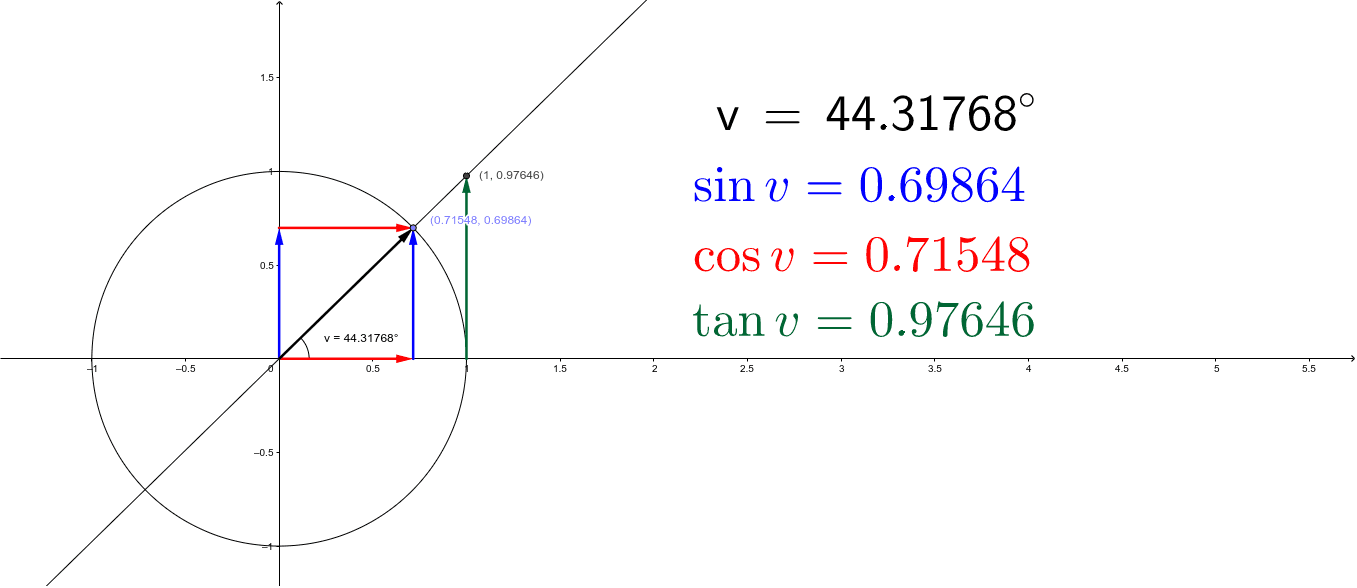
This example dynamically demonstrates the relationship between points, vectors, and trigonometric functions on the unit circle, visually illustrating the definition of trigonometric functions. Core concepts include the unit circle, trigonometric function definitions, vectors, angles, and orthogonal lines. The construction utilizes commands and objects such as Intersect (intersection), Point (point), Circle (circle), Line (line), OrthogonalLine (orthogonal line), Vector (vector), Angle (angle), and LaTeX (formula display). It is suitable for high school mathematics teaching, helping students understand the intrinsic connection between trigonometric functions and the unit circle, and enhancing spatial imagination skills.
GeoGebra Commands & Parameters
Intersect(xAxis, yAxis) → APoint(xAxis) → BCircle(A, B) → cPoint(c) → CLine(A, C) → aOrthogonalLine(C, xAxis) → bOrthogonalLine(C, yAxis) → dIntersect(c, xAxis) → D, EOrthogonalLine(D, xAxis) → eIntersect(a, e) → FIntersect(b, xAxis) → GIntersect(d, yAxis) → HVector(G, C) → uVector(D, F) → v_1Vector(H, C) → wAngle(D, A, C) → vVector(A, G) → zVector(A, H) → fVector(A, C) → gLaTeX(v, true, true) → text3
AI Drawing Prompt Reference
Draw a unit circle with a point on it. Draw a line segment from the origin to the point, and perpendicular lines from the point to the x and y axes, forming a right triangle. Find the foot of the perpendicular from the point to the x-axis, and draw a perpendicular line from this foot to the line segment, meeting at another point. Draw vectors from the origin to the point, and from the foot of the perpendicular and the meeting point to the point. Label the vectors and angles, displaying the angle value, to illustrate the relationship between trigonometric functions and the unit circle.
The prompt above was compiled from the original drawing commands and is for reference only.