
Trigonometry in a Unit Circle
Loading the math board and drawing, please wait…
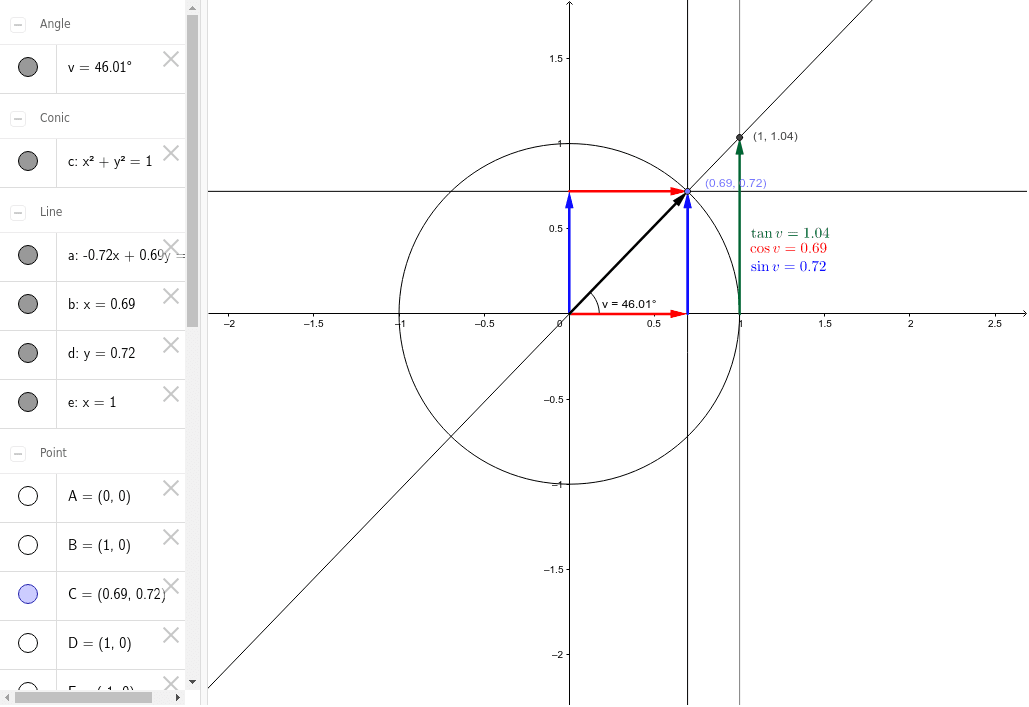
This example demonstrates the definitions of sine, cosine, and tangent functions using a unit circle. It involves core math concepts like the unit circle, trigonometric function definitions, and right triangle side length relationships. GeoGebra commands and objects used include Intersect, Point, Circle, Line, OrthogonalLine, Vector, and Angle for geometric construction. Suitable for high school students learning the geometric meaning of trigonometric functions.
GeoGebra Commands & Parameters
Intersect(xAxis, yAxis) → APoint(xAxis) → BCircle(A, B) → cPoint(c) → CLine(A, C) → aOrthogonalLine(C, xAxis) → bOrthogonalLine(C, yAxis) → dIntersect(c, xAxis) → D, EOrthogonalLine(D, xAxis) → eIntersect(a, e) → FIntersect(b, xAxis) → GIntersect(d, yAxis) → HVector(G, C) → uVector(D, F) → v_1Vector(H, C) → wAngle(D, A, C) → vVector(A, G) → zVector(A, H) → fVector(A, C) → g
AI Drawing Prompt Reference
Draw a unit circle and mark the intersection point on the x-axis and y-axis. Then draw a line from the intersection point to a point on the circle, and draw perpendicular lines from this point to the x-axis and y-axis, marking the intersections as D and E respectively. Next, draw a line from D to the intersection point on the x-axis, and from this point draw a line to the intersection point on the y-axis. Finally, draw vectors from G to C, from D to F, and from H to C, and mark the angle between D, A, and C.
The prompt above was compiled from the original drawing commands and is for reference only.