
Trigonometric Ratios of an Acute Angle (Sine, Cosine, Tangent)
Loading the math board and drawing, please wait…
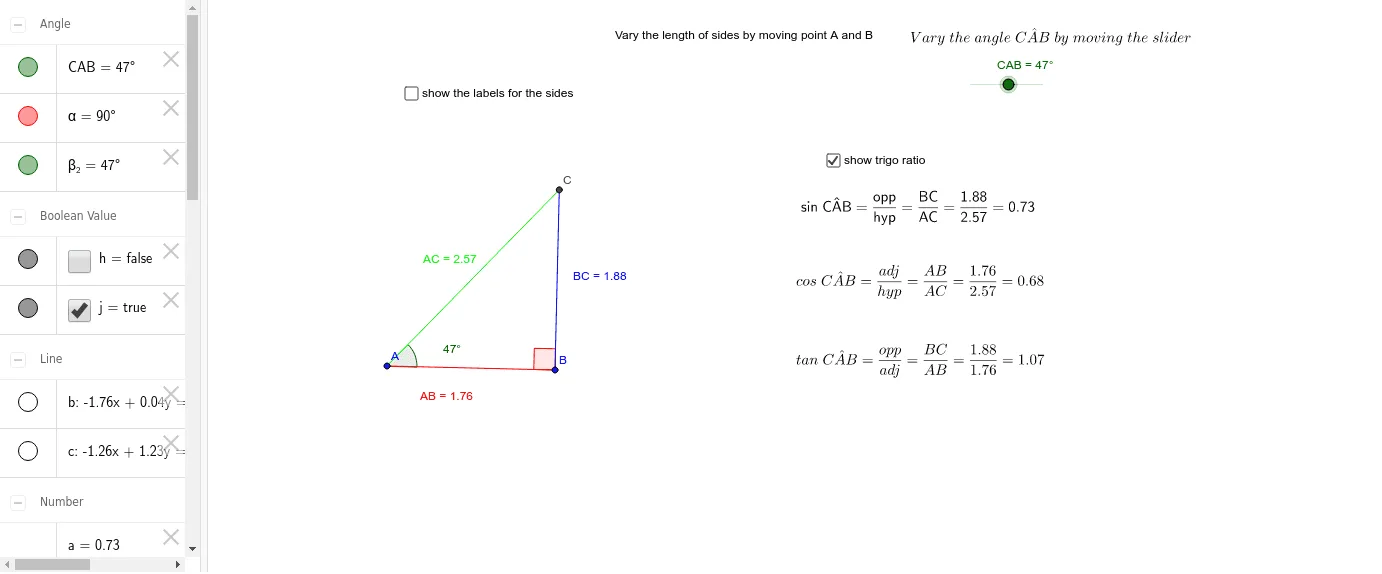
① This example dynamically demonstrates the sine, cosine, and tangent ratios of an acute angle in a right triangle, visually linking the angle to side-length proportions. ② The core mathematical concept is the definition of trigonometric ratios for acute angles: the ratios of opposite, adjacent, and hypotenuse sides, and how these ratios change as the angle varies. ③ Construction highlights: using GeoGebra commands such as Segment, Rotate, Angle, OrthogonalLine, Line, and Intersect to build the right triangle, with text objects (text1 to text5) displaying side lengths and trigonometric values, and sliders/angles (β_2, α) to adjust the angle dynamically. ④ Suitable for upper middle school or lower high school students learning introductory trigonometry, and for teachers to illustrate the geometric meaning of trigonometric ratios in classroom demonstrations.
GeoGebra Commands & Parameters
Segment(A, B) → ABRotate(B, CAB, A) → B'Angle(B, A, B') → β_2OrthogonalLine(B, AB) → bLine(A, B') → cIntersect(b, c) → CSegment(A, C) → ACSegment(B, C) → BCAngle(C, B, A) → αSegment(C, B) → fSegment(A, C) → gSegment(A, B) → i
AI Drawing Prompt Reference
Draw a right triangle with a right angle and an acute angle β_2. Rotate point B to get point B', construct angle β_2, then find point C by intersecting the line through B' and A with a line perpendicular to AB through B. Connect points A, C, and B to form triangle ABC. Display angle α and the lengths of sides AC, BC, and AB, along with their corresponding sine, cosine, and tangent values.
The prompt above was compiled from the original drawing commands and is for reference only.