
Trigonometric Ratios GeoGebra Example
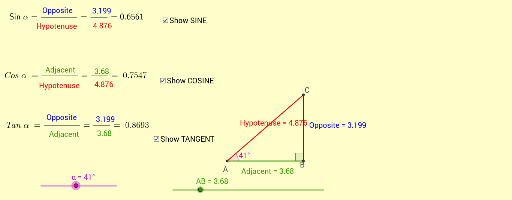
Loading the math board and drawing, please wait…
This example demonstrates the geometric meaning of trigonometric ratios (sine, cosine, tangent) in right-angled triangles. It involves core math concepts like the definition of trigonometric functions, relationships between sides and angles in right triangles, and geometric transformations. GeoGebra commands used include Intersect, Circle, Tangent, Rotate, Angle, Ray, and Segment for construction. Suitable for high school mathematics teaching to visually understand the connection between trigonometric functions and geometric figures.
GeoGebra Commands & Parameters
Intersect(xAxis, yAxis) → ACircle(A, B) → cTangent(B, c) → b,Rotate(B, α, A) → A'Angle(B, A, A') → βRay(A, A') → dIntersect(b, d) → CSegment(A, B) → AdjacentSegment(B, C) → OppositeSegment(A, C) → HypotenuseAngle(C, B, A) → γ
AI Drawing Prompt Reference
Draw a right triangle to illustrate the geometric meaning of sine, cosine, and tangent functions. Start by drawing coordinate axes that intersect at the origin. Draw a circle centered at the origin that intersects the x-axis at a point. From this point, draw a tangent to the circle. Rotate the tangent point around the origin by an angle α, connect the rotated point to the origin, and draw a ray from the origin to the rotated point. The intersection of the tangent and the ray forms a right triangle with the origin and the circle center. Label the two legs and the hypotenuse of the triangle, and mark the three angles.
The prompt above was compiled from the original drawing commands and is for reference only.