
Trigonometric Functions in Right Triangles by blanchal
Loading the math board and drawing, please wait…
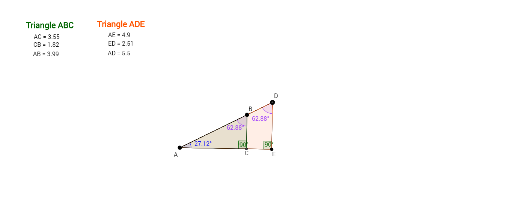
This example demonstrates how to define and apply trigonometric functions (sine, cosine, tangent) in right triangles. It involves core math concepts like trigonometric definitions, right triangle properties, angle measurement, and side length relationships. GeoGebra commands/objects used include Segment, LineBisector, Point, Intersect, Angle, Line, OrthogonalLine, Polygon, and Distance. Suitable for high school students learning the geometric meaning of trigonometric functions and geometric construction lessons.
GeoGebra Commands & Parameters
Segment(A, B_1) → fLineBisector(A, B_1) → gPoint(g) → BIntersect(f, g) → CAngle(A, C, B) → αSegment(A, C) → bSegment(B, A) → c_3Segment(C, B) → a_4Line(A, B) → kPoint(k) → DOrthogonalLine(D, f) → lIntersect(l, f) → EIntersect(k, l) → GSegment(B, D) → eSegment(D, E) → a'Segment(E, C) → dSegment(B, D) → qSegment(D, E) → rSegment(E, A) → sSegment(A, D) → tSegment(B, C) → a_3Polygon(A, B, C) → poly1, d_1, a_1, c_1Polygon(A, D, E) → poly2, f_1, a_2, e_1Angle(A, E, D) → βAngle(B, A, C) → γAngle(A, B, C) → δAngle(A, D, E) → εSegment(A, C) → b_2Segment(A, B) → c_2Segment(A, B) → cDistance(A, C) → distanceACDistance(A, E) → distanceAEDistance(A, B) → distanceABDistance(A, D) → distanceADDistance(C, B) → distanceCBDistance(E, D) → distanceED