
30°-60°-90° Special Right Triangle
Loading the math board and drawing, please wait…
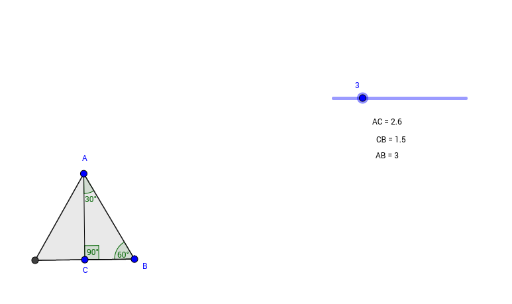
This example demonstrates the properties of the 30°-60°-90° special right triangle. Key mathematical concepts include trigonometry and proportional relationships. Using GeoGebra commands such as Point, Segment, Polygon, etc., the side length relationships of the triangle are dynamically displayed. Suitable for middle school and above students.
GeoGebra Commands & Parameters
Point(Circle[A_1, a]) → BSegment(A_1, B) → fPolygon(A_1, B, 3) → poly1, g, h, i, AAngularBisector(A_1, A, B) → jIntersect(j, f) → CSegment(A, C) → kSegment(C, B) → lDistance(A, C) → distanceACDistance(C, B) → distanceCBDistance(A, B) → distanceABAngle(C, A, B) → αAngle(B, C, A) → βAngle(A, B, C) → γ
AI Drawing Prompt Reference
Draw a 30°-60°-90° special right triangle. Start with a horizontal base segment. Using one endpoint as the center and the base length as the radius, draw a circle and pick a point on the circle as the triangle's apex. Connect this apex to both endpoints of the base to form the triangle. Then, from one base endpoint, draw an angle bisector that intersects the opposite side, marking the intersection point. Connect this intersection point to the other two vertices to create internal segments. Finally, label the lengths of all three sides and the measures of the three interior angles, which are 30°, 60°, and 90° respectively.
The prompt above was compiled from the original drawing commands and is for reference only.