
Trigonometric Functions and Unit Circle by Mikkel Stouby Petersen
Loading the math board and drawing, please wait…
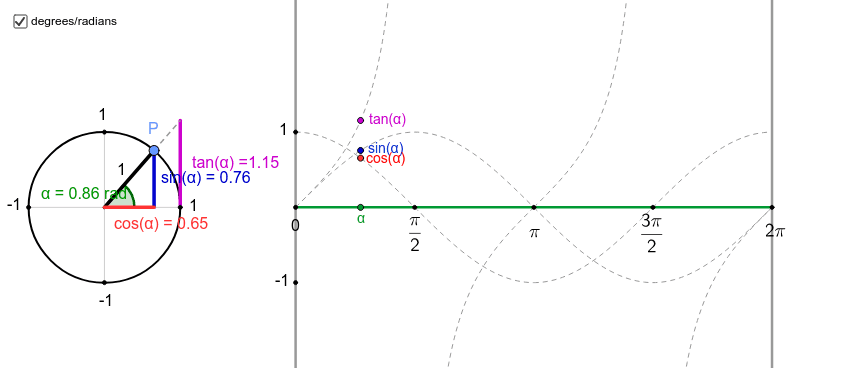
This example directly demonstrates the relationship between trigonometric functions defined by the unit circle and their graphs. Key mathematical concepts include trigonometric functions, unit circle, and coordinate geometry. Commands used include Point, Circle, Ray, Intersect, Angle, Segment, etc. Suitable for high school math education and students learning trigonometric functions.
GeoGebra Commands & Parameters
Point(xAxis) → ICircle(A, 1) → cPoint(c) → PRay(P, A) → lRay(A, P) → dIntersect(c, xAxis, 2) → BAngle(B, A, P) → αIntersect(c, yAxis, 1) → CIntersect(c, xAxis, 1) → DIntersect(c, yAxis, 2) → ESegment(G, P) → aOrthogonalLine(B, xAxis) → eIntersect(e, l) → RIntersect(d, e) → HSegment(H, B) → fIf(x(P) > 0, (x(J), y(H)), (x(J), y(R))) → MLocus(M, P) → loc1Locus(L, P) → loc2Locus(K, P) → loc3OrthogonalLine(I, xAxis) → iSegment(A, H) → kSegment(B, R) → mOrthogonalLine(S, xAxis) → gSegment(E, C) → hSegment(B, D) → jSegment(I, S) → nSegment(A, P) → pSegment(A, R) → qSegment(P, H) → rMidpoint(H, B) → Q_2Midpoint(G, A) → UMidpoint(G, P) → WMidpoint(A, P) → ZMidpoint(R, B) → Q_3Point(p) → FSegment(A, G) → s
AI Drawing Prompt Reference
Draw a unit circle and place a point I on the x-axis. Draw a circle c with I as the center. On circle c, place a point P and draw rays l and d from P to the x-axis and y-axis, respectively, with their intersections with circle c being points B and C. Draw a tangent line to circle c at point P, and let it intersect rays l and d at points R and H. Connect these points to form triangles and segments, illustrating the graphs of sine and cosine functions.
The prompt above was compiled from the original drawing commands and is for reference only.