
Trig Ratios in Similar Right Triangles by Mr. Herrle
Loading the math board and drawing, please wait…
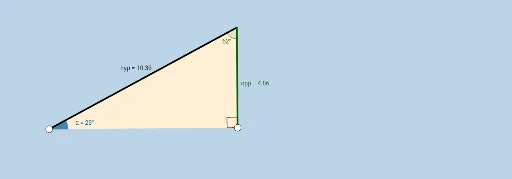
This example demonstrates the constant trigonometric ratios (sine, cosine, tangent) in similar right triangles. It involves core concepts like trigonometric functions, similarity criteria and properties, and right triangle side-angle relationships. Constructed using commands such as Ray, OrthogonalLine, Point, Rotate, Angle, Intersect, Segment, Polygon. Suitable for middle school and above students to understand and verify the application of trigonometry in similar figures.
GeoGebra Commands & Parameters
Ray(A, C) → a_1OrthogonalLine(C, a_1) → bPoint(b) → C_1Ray(C, C_1) → cRotate(C, β, A) → B'Angle(C, A, B') → αRay(A, B') → dIntersect(c, d) → DSegment(A, D) → hypSegment(A, C) → adjSegment(C, D) → oppAngle(D, C, A) → γPolygon(A, C, D) → poly1, d_1, a, b_1Angle(A, D, C) → δ
AI Drawing Prompt Reference
Draw a right triangle and extend one of its legs as a ray. Then draw a perpendicular line from the right angle to the extended ray and mark a point on this line. Connect this point to the right angle to form another triangle. Rotate the new triangle around the right angle so that the two triangles are similar. Label the corresponding sides and angles of the triangles and show their similarity.
The prompt above was compiled from the original drawing commands and is for reference only.