
Intersection of Two Planes: Dynamic 3D Geometry
Loading the math board and drawing, please wait…
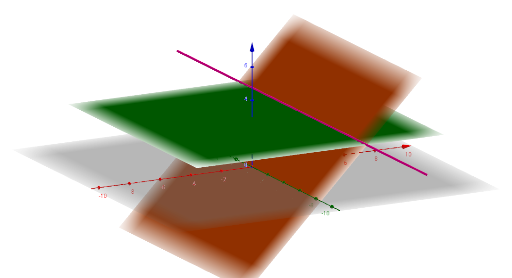
① This GeoGebra example demonstrates the intersection line of two planes in 3D space, allowing learners to visualize how two planes meet along a straight line. ② Core mathematical concepts include spatial geometry, plane equations, the line of intersection, and the relationship between normal vectors and the direction vector of the intersection line. ③ Construction details: The example uses the Plane command to define two planes (one through points A, B, C and another through D, E, F), and the IntersectPath command to compute and display the intersection line. Objects include points, planes, and the intersection path, which can be dynamically adjusted to observe changes. ④ Suitable for high school solid geometry or introductory university analytic geometry courses, serving as an interactive demonstration or self-study tool to enhance spatial reasoning.
GeoGebra Commands & Parameters
Plane(B, A, C) → aPlane(C, A, B) → bPlane(B, A, C) → cPlane(D, E, F) → dIntersectPath(a, d) → f
AI Drawing Prompt Reference
Draw the intersection line of two planes in 3D space, one defined by three points and the other by a different set of three points, showing their line of intersection and allowing dynamic adjustment of the points to observe changes in the planes and the line.
The prompt above was compiled from the original drawing commands and is for reference only.