
Triaxial Tear Drop Curve
Loading the math board and drawing, please wait…
In collections
geometriadinamica.es
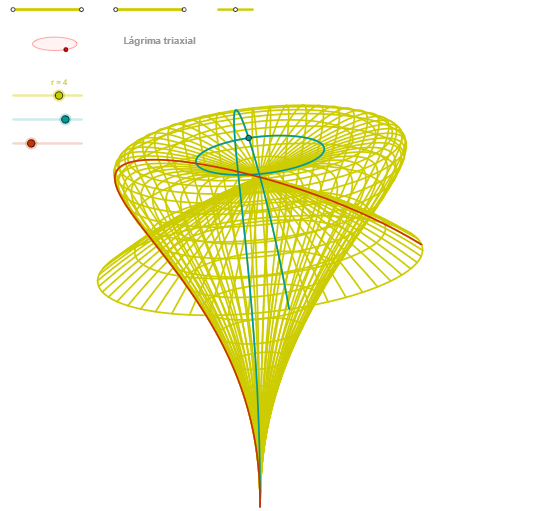
This example demonstrates the construction of a triaxial tear drop curve. It involves concepts of ellipses and angles. Using GeoGebra commands such as Segment, Point, Ellipse, and Intersect, the triaxial tear drop curve can be constructed. Suitable for high school mathematics education and learning.
GeoGebra Commands & Parameters
Segment(Q3, Q4) → p2Point(p2) → P3Segment(P3, Q4) → p4Point(p4) → P4Segment(Q1, Q2) → p1Point(p1) → P1Segment(P1, Q2) → p3Point(p3) → P2OrthogonalLine(C, yAxis) → zz1Circle(C, 0.62) → zz0Intersect(zz0, zz1, 1) → ZZ1Intersect(zz0, zz1, 2) → ZZ2Ellipse(ZZ1, ZZ2, 0.65) → zElipse1Intersect(zElipse1, zz1) → ZZ5, ZZ6Point(zElipse1) → XYAngle(ZZ6, C, XY) → zAngRotOrthogonalLine(C, xAxis) → zz2Intersect(zz0, zz2, 2) → ZZ3Intersect(zz0, zz2, 1) → ZZ4Ellipse(ZZ3, ZZ4, 0.65) → zElipse2Intersect(zElipse2, zz2) → ZZ7, ZZ8Point(zElipse2) → ZAngle(ZZ8, C, Z) → zAngIncSegment(Q5, Q6) → p5Point(p5) → P5Segment(ZZ5, ZZ6) → zz4Segment(ZZ7, ZZ8) → zz3Intersect(zElipse2, zElipse1, 1) → zPunto1Intersect(zElipse2, zElipse1, 4) → zPunto2Segment(zPunto1, zPunto2) → zSeg2CurveCartesian(((2 * r) * (((((1 - cos(α)) * cos(α + (2 * 3.14159 / 3))) * cos(v + (2 * 3.14159 / 3)) / 2) * sin(zAngRot)) + ((((1 - cos(α)) * cos(α + (2 * 3.14159 / 3))) * cos(v - (2 * 3.14159 / 3)) / 2) * cos(zAngRot)))), ((2 * r) * ((((((-(1 - cos(α))) * cos(α + (2 * 3.14159 / 3))) * cos(v + (2 * 3.14159 / 3)) / 2) * cos(zAngRot)) * sin(zAngInc)) + (((((1 - cos(α)) * cos(α + (2 * 3.14159 / 3))) * cos(v - (2 * 3.14159 / 3)) / 2) * sin(zAngRot)) * sin(zAngInc)) + (cos(α - (2 * 3.14159 / 3)) * cos(zAngInc)))) - 3, v, v1, v2) → curva2CurveCartesian(((2 * r) * (((((1 - cos(u)) * cos(u + (2 * 3.14159 / 3))) * cos(3.14159 + (2 * 3.14159 / 3)) / 2) * sin(zAngRot)) + ((((1 - cos(u)) * cos(u + (2 * 3.14159 / 3))) * cos(3.14159 - (2 * 3.14159 / 3)) / 2) * cos(zAngRot)))), ((2 * r) * ((((((-(1 - cos(u))) * cos(u + (2 * 3.14159 / 3))) * cos(3.14159 + (2 * 3.14159 / 3)) / 2) * cos(zAngRot)) * sin(zAngInc)) + (((((1 - cos(u)) * cos(u + (2 * 3.14159 / 3))) * cos(3.14159 - (2 * 3.14159 / 3)) / 2) * sin(zAngRot)) * sin(zAngInc)) + (cos(u - (2 * 3.14159 / 3)) * cos(zAngInc)))) - 3, u, u1, u2) → curva1CurveCartesian(((2 * r) * (((((1 - cos(u)) * cos(u + (2 * 3.14159 / 3))) * cos(β + (2 * 3.14159 / 3)) / 2) * sin(zAngRot)) + ((((1 - cos(u)) * cos(u + (2 * 3.14159 / 3))) * cos(β - (2 * 3.14159 / 3)) / 2) * cos(zAngRot)))), ((2 * r) * ((((((-(1 - cos(u))) * cos(u + (2 * 3.14159 / 3))) * cos(β + (2 * 3.14159 / 3)) / 2) * cos(zAngRot)) * sin(zAngInc)) + (((((1 - cos(u)) * cos(u + (2 * 3.14159 / 3))) * cos(β - (2 * 3.14159 / 3)) / 2) * sin(zAngRot)) * sin(zAngInc)) + (cos(u - (2 * 3.14159 / 3)) * cos(zAngInc)))) - 3, u, u1, u2) → a1Sequence(CurveCartesian[((2 * r) * (((((1 - cos(u)) * cos(u + (2 * 3.14159 / 3))) * cos(v + (2 * 3.14159 / 3)) / 2) * sin(zAngRot)) + ((((1 - cos(u)) * cos(u + (2 * 3.14159 / 3))) * cos(v - (2 * 3.14159 / 3)) / 2) * cos(zAngRot)))), ((2 * r) * ((((((-(1 - cos(u))) * cos(u + (2 * 3.14159 / 3))) * cos(v + (2 * 3.14159 / 3)) / 2) * cos(zAngRot)) * sin(zAngInc)) + (((((1 - cos(u)) * cos(u + (2 * 3.14159 / 3))) * cos(v - (2 * 3.14159 / 3)) / 2) * sin(zAngRot)) * sin(zAngInc)) + (cos(u - (2 * 3.14159 / 3)) * cos(zAngInc)))) - 3, v, v1, v2], u, u1, u2, paso) → list2Sequence(CurveCartesian[((2 * r) * (((((1 - cos(u)) * cos(u + (2 * 3.14159 / 3))) * cos(v + (2 * 3.14159 / 3)) / 2) * sin(zAngRot)) + ((((1 - cos(u)) * cos(u + (2 * 3.14159 / 3))) * cos(v - (2 * 3.14159 / 3)) / 2) * cos(zAngRot)))), ((2 * r) * ((((((-(1 - cos(u))) * cos(u + (2 * 3.14159 / 3))) * cos(v + (2 * 3.14159 / 3)) / 2) * cos(zAngRot)) * sin(zAngInc)) + (((((1 - cos(u)) * cos(u + (2 * 3.14159 / 3))) * cos(v - (2 * 3.14159 / 3)) / 2) * sin(zAngRot)) * sin(zAngInc)) + (cos(u - (2 * 3.14159 / 3)) * cos(zAngInc)))) - 3, u, u1, u2], v, v1, v2, paso) → list1
AI Drawing Prompt Reference
Draw a triaxial tear drop curve. The figure includes two ellipses, multiple intersection points, angles, and curves. Construction order: first draw line segments and points, then construct ellipses using circles and intersecting lines, then calculate angles between ellipses and lines, then construct another ellipse, and finally generate curves through intersection points of ellipses.
The prompt above was compiled from the original drawing commands and is for reference only.