
Triangular Prism Cross Section
Loading the math board and drawing, please wait…
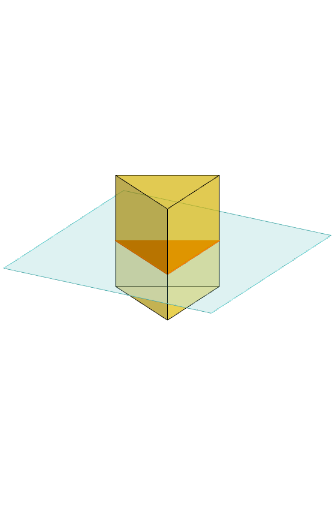
This example demonstrates the cross section of a triangular prism. Key mathematical concepts include the properties of a triangular prism in solid geometry. Construction highlights the use of Polygon, PointIn, Translate, Rotate, Prism, and other GeoGebra commands. Suitable for middle school and above students learning solid geometry.
GeoGebra Commands & Parameters
Polygon(B + (-2, -2), B + (2, -2), B + (2, 2), B + (-2, 2)) → poly3, e, f, g, iPointIn(poly3) → CTranslate((0, 0, 0), Vector[B, C]) → APolygon(A + (-4, -4), A + (4, -4), A + (4, 4), A + (-4, 4)) → poly1, a, b, c, dRotate(Rotate[Translate[poly1, Vector[A, A + (0, 0, h)]], (90° * s), A + (0, 0, h), yAxis], (90° * t), A, zAxis) → poly2Rotate(D, 120°, (0, 0, 0)) → EPolygon(D, E, 3, xOyPlane) → poly4, j, k, l, FPrism(poly4, D + (0, 0, 4)) → m, M, edge4, edge5, edge6, N, face1, face2, face3, face4, edge1, edge2, edge3PointIn(poly2) → GPointIn(poly2) → HPointIn(poly2) → IPlane(G, I, H) → nIntersectPath(n, m) → poly6, poly5, r, a_1, b_1, c_1, K, L_1, O, P, J, L, p, qRotate(m, 0, zAxis) → m'Rotate(m, 0, zAxis) → m'_1OrthogonalLine(A, n) → d_1
AI Drawing Prompt Reference
Draw the cross section of a triangular prism, start by constructing a rectangle, then randomly select a point inside the rectangle and form a triangle with it as a vertex, extend the triangle vertically to create the prism, draw three line segments from the rectangle's vertices to represent the prism's edges, and finally, draw a cross-section inside the prism consisting of three points and their connecting lines, parallel to the base and not passing through the prism's central axis.
The prompt above was compiled from the original drawing commands and is for reference only.