
Triangle Umbrella
Loading the math board and drawing, please wait…
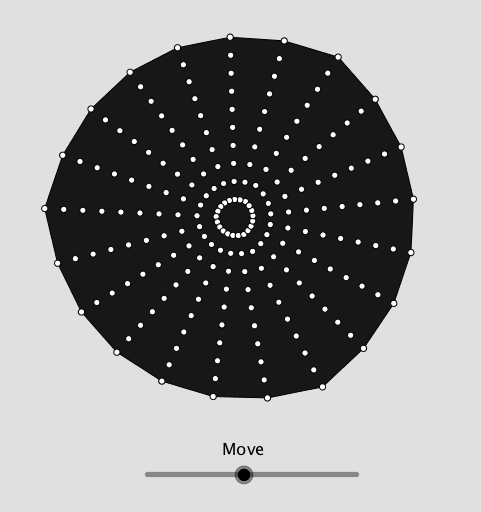
This example demonstrates the geometric construction of a triangle umbrella. It involves core mathematical concepts such as triangles, rotation, and translation. Using GeoGebra commands like Sequence, Polygon, and Circle, the dynamic rotation and translation of triangles are displayed. Suitable for students at the junior high school level and above to learn about geometric transformations and dynamic geometry.
GeoGebra Commands & Parameters
Sequence(Rotate[(1, 0), ((2 * π) * i / n), (0, 0)], i, 1, n) → list1Sequence(Rotate[Segment[(0, 0), (1, 0)], ((2 * π) * i / s), (0, 0)], i, 0, s) → list2Polygon(list1) → poly1Sequence(Intersect[Element[list2, i], poly1], i, 1, s) → list3Circle((0, 0), 1) → cSequence(Intersect[c, Element[list2, i]], i, 1, s) → list4Midpoint(A, B) → CSequence(Vector[(trans * Vector[Element[list3, i], Element[list4, i]])], i, 1, s) → list5Sequence(Translate[Element[list3, i], Vector[Element[list5, i]]], i, 1, s) → list6Sequence(Rotate[Element[list6, i], rot, (0, 0)], i, 1, s) → list7Sequence(Sequence[Dilate[Element[list7, i], j, (0, 0)], i, 1, s], j, 0.2, 2, 0.2) → list8Length(list8) → aLast(list8) → list9Polygon(Element[list9, 1]) → poly2
AI Drawing Prompt Reference
Create a geometric construction of a triangle umbrella, demonstrating the dynamic rotation and translation of triangles. Begin by drawing a list of rotated line segments and form them into a polygon. Then, calculate the intersections of this polygon with a series of rotated line segments and a circle. Use these intersection points and translation vectors to generate a series of new polygons, which are further transformed through rotation and scaling to create the final dynamic umbrella shape.
The prompt above was compiled from the original drawing commands and is for reference only.