
Triangle Translation by Mark Hoffman
Loading the math board and drawing, please wait…
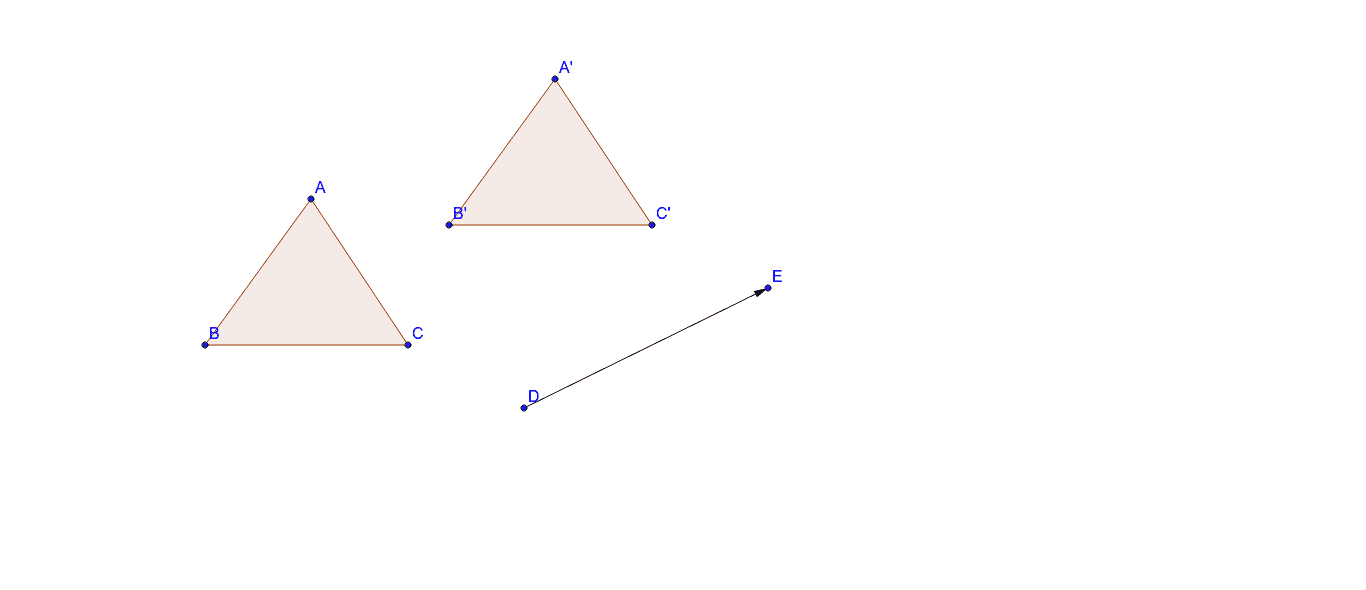
This GeoGebra example demonstrates the translation transformation of a triangle along a vector direction. The core mathematical concepts involve translation and vector application. Construction key points: Use the Polygon command to draw triangle ABC, define the translation vector v, and apply the Translate command to move triangle ABC along vector v to obtain corresponding points A', B', C', creating the translated triangle A'B'C'. This example intuitively shows that in translation transformation, segments connecting corresponding points are parallel and equal, and the corresponding sides of congruent triangles remain parallel. Suitable for middle school mathematics teaching, introducing vector concepts to students, and understanding geometric transformations.
GeoGebra Commands & Parameters
Polygon(A, B, C) → poly1, c, a, bVector(D, E) → uTranslate(A, u) → A'Translate(B, u) → B'Translate(C, u) → C'Polygon(A', B', C') → poly1', c', a', b'
AI Drawing Prompt Reference
Draw a triangle ABC and translate it along a vector v to get triangle A'B'C'. First, draw triangle ABC. Then, define the vector v. Next, move each point A, B, and C along vector v to get A', B', and C'. Finally, draw triangle A'B'C'. This figure shows the translation transformation, where segments connecting corresponding points are parallel and equal, and corresponding sides of congruent triangles remain parallel.
The prompt above was compiled from the original drawing commands and is for reference only.