
Triangle Transformations Example 5
Loading the math board and drawing, please wait…
In collections
Triangle Transformations Activity
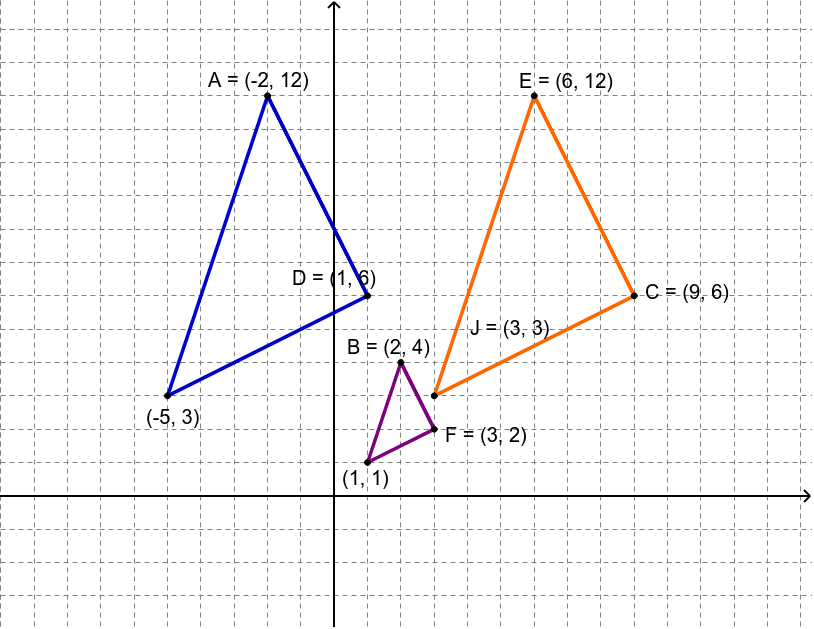
This example demonstrates transformations of triangles, including similar triangles and homothety. Using commands like Vector, Segment, Line, Dilate, and Translate, dynamic observations of triangle properties and changes can be made. Suitable for teacher demonstrations and student practice.
GeoGebra Commands & Parameters
Intersect(xAxis, yAxis) → C_1Vector(C_1, C_2) → uSegment(B, F) → aLine(A_1, B_1) → bDilate(B, 3, C_1) → EDilate(F, 3, C_1) → CSegment(E, C) → a'Translate(E, u) → ATranslate(C, u) → DSegment(A, D) → a''Polygon(B, F, G) → poly1, g, b_1, fDilate(B, 3, C_1) → B'Dilate(F, 3, C_1) → F'Dilate(G, 3, C_1) → JPolygon(B', F', J) → poly1', g', b', f'Translate(B', u) → B''Translate(F', u) → F''Translate(J, u) → HPolygon(B'', F'', H) → poly1'', g'', b'', f''
AI Drawing Prompt Reference
Draw a triangle, then scale it by a factor of three from a point, and translate it by a vector to observe similar triangles and homothety. Next, translate the scaled triangle, scale it again by a factor of three, and translate it to observe the relationships of the transformed shapes.
The prompt above was compiled from the original drawing commands and is for reference only.