
Triangle Transformations Demo by stcarranza (3)
Loading the math board and drawing, please wait…
In collections
Triangle Transformations Activity
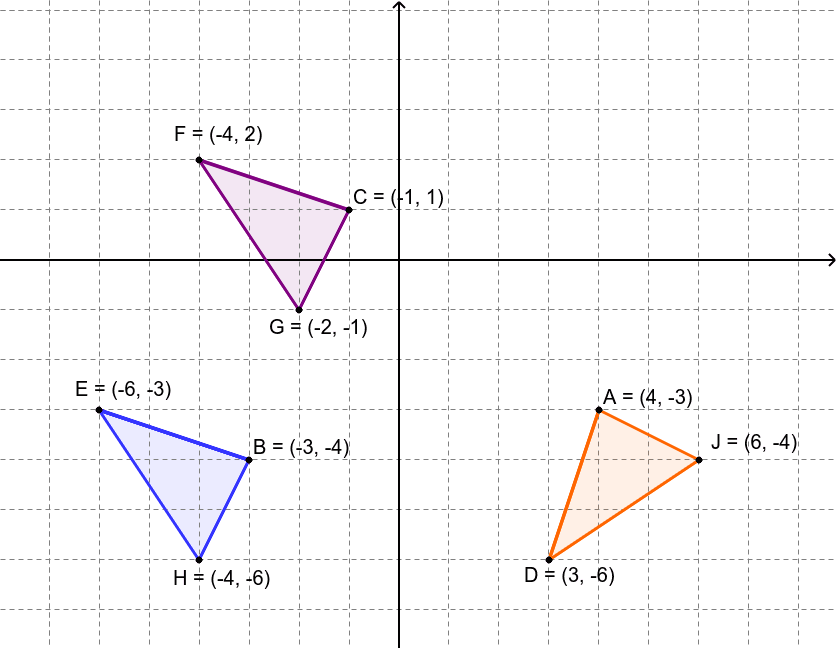
This example demonstrates geometric transformations of triangles, including translation and rotation. Core math concepts involved are vectors, polygons, and transformations. Construction highlights include using GeoGebra commands like Intersect, Vector, Segment, Translate, Rotate, and Polygon. Suitable for high school mathematics teacher demonstration and student practice.
GeoGebra Commands & Parameters
Intersect(xAxis, yAxis) → C_1Vector(C_1, C_2) → uSegment(F, C) → aTranslate(F, u) → ETranslate(C, u) → BSegment(E, B) → a'Rotate(E, 90*°, C_1) → DRotate(B, 90*°, C_1) → ASegment(D, A) → a''Polygon(C, G, F) → poly1, f, c, gTranslate(C, u) → C'Translate(G, u) → HTranslate(F, u) → F'Polygon(C', H, F') → poly1', f', c', g'Rotate(C', 90*°, C_1) → C''Rotate(H, 90*°, C_1) → JRotate(F', 90*°, C_1) → F''Polygon(C'', J, F'') → poly1'', f'', c'', g''
AI Drawing Prompt Reference
First, draw two intersecting points as reference. Then, create a vector connecting these points. Next, draw the original triangle and translate and rotate it. The translated version becomes a new triangle, and the rotated version becomes another. Finally, connect these points to form polygons, illustrating the transformation of the triangle.
The prompt above was compiled from the original drawing commands and is for reference only.