
Triangle Ratios Demo
Loading the math board and drawing, please wait…
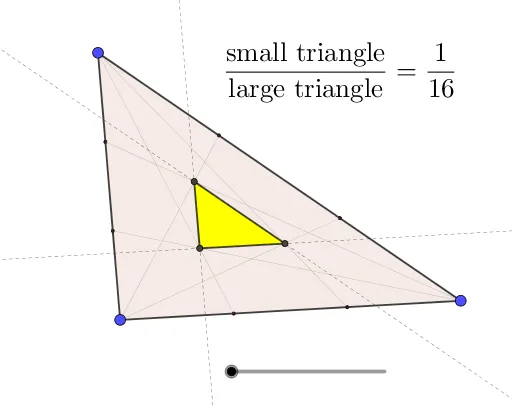
This example demonstrates the ratio relationships within a triangle and its sides. It involves core math concepts like ratios, polygons, arithmetic operations, hyperbolas, and subtraction. Construction highlights include using GeoGebra commands such as Sequence, Intersect, Polygon, Line, and FractionText to create shapes and perform calculations. Suitable for high school mathematics education to understand geometric proportionality and computational methods.
GeoGebra Commands & Parameters
Sequence(A + (w * (B - A)), w, 0, 1, 1 / n) → L_1Sequence(A + (w * (C - A)), w, 0, 1, 1 / n) → L_2Sequence(B + (w * (C - B)), w, 0, 1, 1 / n) → L_3Sequence(Segment[A, B + (w * (C - B))], w, 0, 1, 1 / n) → L_4Sequence(Segment[B, A + (w * (C - A))], w, 0, 1, 1 / n) → L_5Sequence(Segment[C, A + (w * (B - A))], w, 0, 1, 1 / n) → L_6Intersect(Segment[C, A + (floor(n / 2) * (B - A) / n)], Segment[B, A + (floor(n / 2) * (C - A) / n)]) → DIntersect(Segment[C, A + (ceil(n / 2) * (B - A) / n)], Segment[A, B + (floor(n / 2) * (C - B) / n)]) → EIntersect(Segment[B, A + (ceil(n / 2) * (C - A) / n)], Segment[A, B + (ceil(n / 2) * (C - B) / n)]) → FPolygon(A, B, C) → t1, c, a, bLine(D, E) → fLine(E, F) → gLine(F, D) → hPolygon(D, E, F) → t2, f_1, d, eFractionText(t2 / t1) → text1
AI Drawing Prompt Reference
Draw a triangle and inscribe three line segments connecting the vertices to points on the sides, forming three smaller triangles. Calculate and display the ratio of the area of one smaller triangle to the larger triangle, annotated as a fraction.
The prompt above was compiled from the original drawing commands and is for reference only.