
Triangle Perimeter & Sum of Angles
Loading the math board and drawing, please wait…
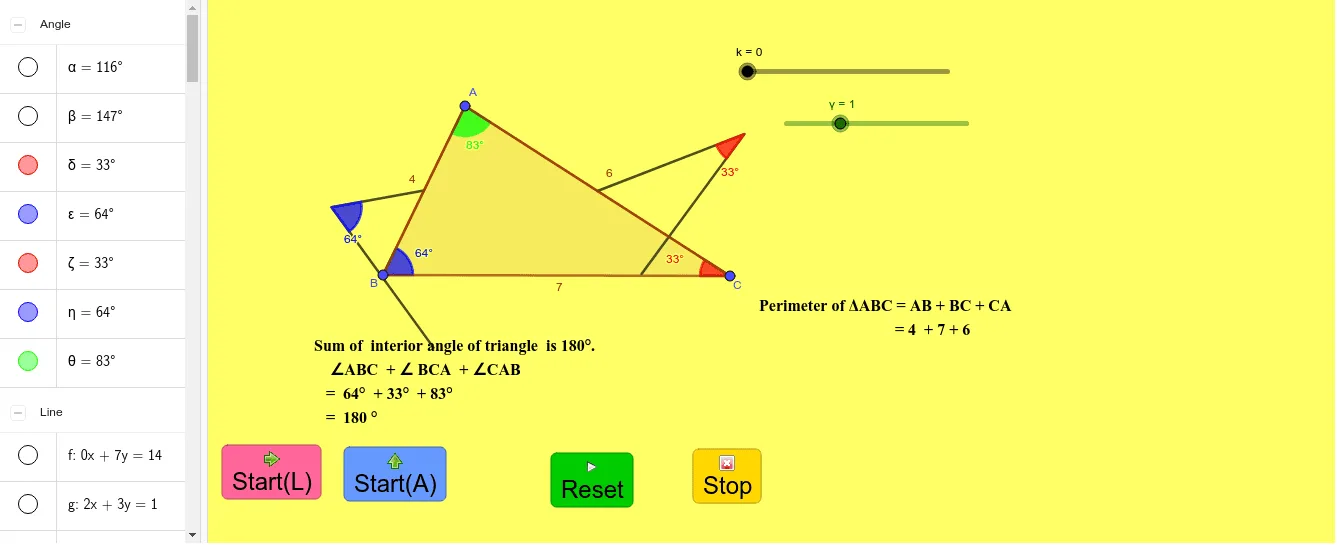
This example demonstrates how to construct a triangle in GeoGebra and calculate its perimeter and sum of interior angles. Core math concepts include perimeter, angle sum, angle measurement, and geometric construction. Key GeoGebra commands and objects used are Polygon, Line, Point, Angle, Rotate, Segment, OrthogonalLine, Intersect, Midpoint, PolyLine. Suitable for middle school students and above for learning geometric basics, ideal for classroom instruction or self-study.
GeoGebra Commands & Parameters
Polygon(A, B, C) → t1, c, a, bLine(B, C) → fPoint(f) → DPoint(f) → EAngle(A, B, D) → αAngle(E, C, A) → βRotate(A, (k * α), B) → A'Rotate(B, (k * α), B) → B'Segment(A', B') → c'Rotate(C, (-((k * β))), C) → C'Rotate(A, (-((k * β))), C) → A'_1Segment(C', A'_1) → b'OrthogonalLine(A', c') → gOrthogonalLine(A'_1, b') → hPoint(g) → FLine(F, a) → iIntersect(h, i) → GSegment(F, G) → jMidpoint(c) → HMidpoint(a) → IMidpoint(b) → JLine(A, a) → lPolyLine(H, B, I) → mPolyLine(I, C, J) → nRotate(I, γ, J) → I'Rotate(C, γ, J) → C'_1Rotate(J, γ, J) → J'PolyLine(I', C'_1, J') → n'Rotate(B, (-γ), B) → B'_1Rotate(B, (-γ), B) → B'_2Rotate(H, (-γ), H) → H'Rotate(B, (-γ), H) → B'_3Rotate(I, (-γ), H) → I'_1PolyLine(H', B'_3, I'_1) → m'Angle(J, C'_1, I') → δAngle(I'_1, B'_3, H) → εAngle(J, C, I) → ζAngle(I, B, H) → ηAngle(H, A, J) → θPoint(l) → KPoint(l) → LSegment(K, L) → pIntersect(k = (0 * γ), k = 0) → MIntersect(k = (0 * γ), k = 0) → NIntersect(k = (0 * γ), k = 0) → OIntersect(k = (0 * γ), k = 0) → PIntersect(k = (0 * γ), k = 0) → QIntersect(k = (0 * γ), k = 0) → RIntersect(k = (0 * γ), k = 0) → SIntersect(k = (0 * γ), k = 0) → TIntersect(k = (0 * γ), k = 0) → UIntersect(k = (0 * γ), k = 0) → VIntersect(k = (0 * γ), k = 0) → WIntersect(k = (0 * γ), k = 0) → ZIntersect(k = (0 * γ), k = 0) → A_1Intersect(k = (0 * γ), k = 0) → B_1Intersect(k = (0 * γ), k = 0) → C_1Intersect(k = (0 * γ), k = 0) → D_1Intersect(k = (0 * γ), k = 0) → E_1Intersect(k = (0 * γ), k = 0) → F_1Intersect(k = (0 * γ), k = 0) → G_1Intersect(k = (0 * γ), k = 0) → H_1
AI Drawing Prompt Reference
Draw a triangle and show its perimeter and sum of interior angles. Start by constructing the triangle, then pick two points on one side and measure two exterior angles. Rotate one vertex around another to create rotated sides, draw perpendiculars, and find new intersections and segments. Next, locate midpoints of all sides, connect them to form inner polylines. Then rotate these midpoints and vertices to generate two sets of rotated polylines, and measure related angles. Finally, pick two points on one side, draw a segment, and attempt to construct several intersection points (which may coincide or not exist).
The prompt above was compiled from the original drawing commands and is for reference only.