
Triangle Orthocenter: Dynamic Construction and Properties
Loading the math board and drawing, please wait…
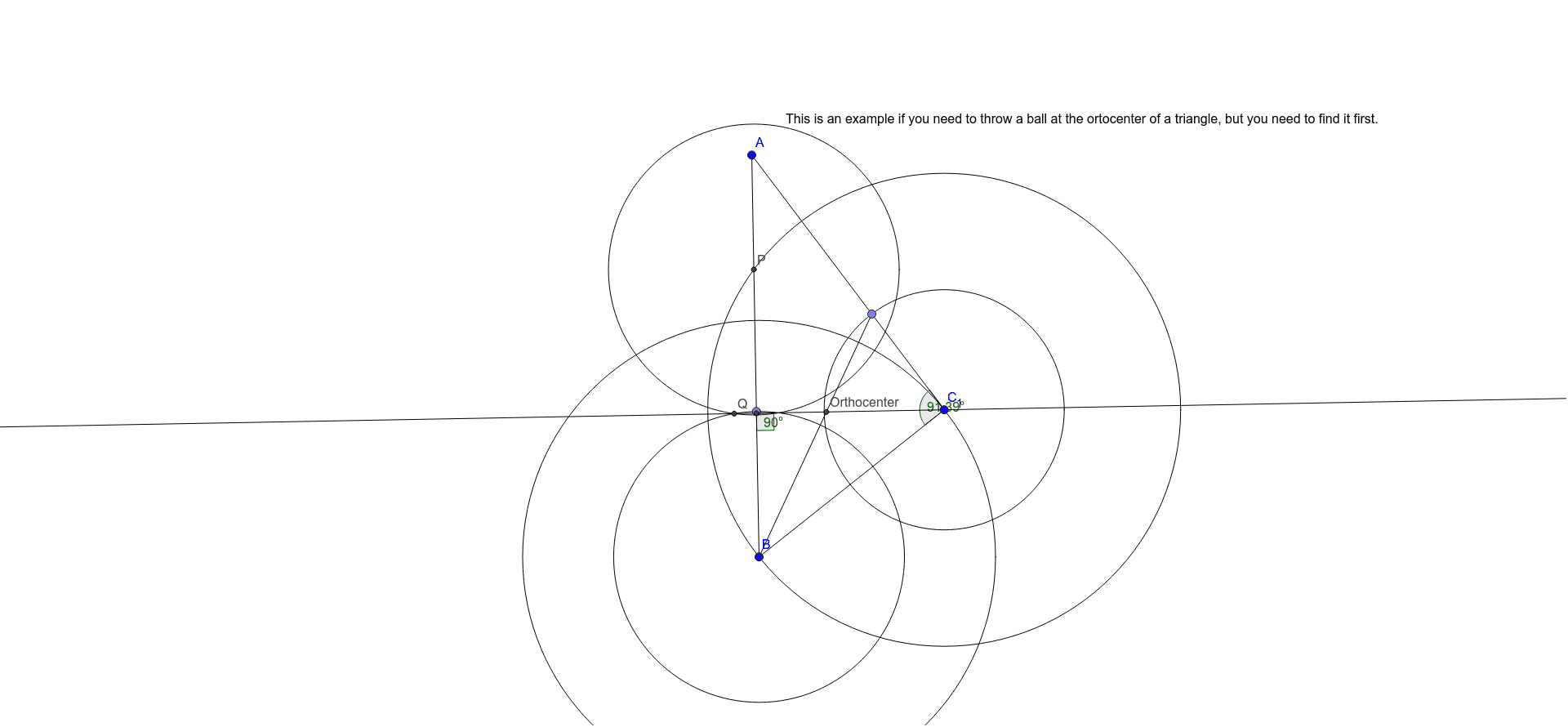
This GeoGebra example dynamically demonstrates the concurrency of the three altitudes of a triangle at the orthocenter, using auxiliary circles, segments, and intersection points to verify the property. Core mathematical concepts include triangle altitudes, the definition of the orthocenter, concurrency proofs, and angle relationships. Construction highlights: commands such as Segment, Line, Circle, Intersect, Point, Angle, and the dedicated Orthocenter command are used to build the figure, with text labels (text1) for clarity. Suitable for middle and high school geometry lessons, this interactive tool helps students visualize the orthocenter, understand why altitudes meet at one point, and explore related angle properties. It serves as an excellent introduction to special points in triangles.
GeoGebra Commands & Parameters
Segment(A, B) → fSegment(B, C_1) → gSegment(C_1, A) → hCircle(B, Segment[B, C_1]) → cCircle(C_1, Segment[B, C_1]) → dIntersect(c, h, 2) → FIntersect(d, f, 1) → PPoint(f) → CCircle(P, Segment[B, C]) → eCircle(B, Segment[B, C]) → kIntersect(e, k, 2) → QLine(Q, C_1) → iIntersect(i, f) → DAngle(B, D, C_1) → αPoint(h) → E_1Circle(F, Segment[C_1, E_1]) → pCircle(C_1, Segment[C_1, E_1]) → qIntersect(p, q, 1) → ELine(B, E) → jIntersect(j, h) → GAngle(B, G, C_1) → βIntersect(i, j) → Orthocenter_1Angle(A, C_1, B) → γSegment(E_1, B) → lIntersect(i, l) → Orthocenter
AI Drawing Prompt Reference
Draw a triangle and construct its three altitudes, which should meet at a single point (the orthocenter). Start by drawing the three sides of the triangle. Then, using one side as a radius, draw two auxiliary circles centered at the two endpoints of that side; their intersection helps determine the direction of an altitude. Repeat this process with other sides to find the feet of the altitudes, and draw lines from each vertex perpendicular to the opposite side. All three altitude lines should intersect at one point, the orthocenter. Finally, mark the orthocenter and display relevant angles to verify the concurrency.
The prompt above was compiled from the original drawing commands and is for reference only.